Knowing how to choose useful everyday accessories starts with a question that product pages rarely ask: do you actually need this? It is easy to collect items that look helpful online, promise a tidier bag or desk, or come in a sleek minimalist design, and then leave them in a drawer. The price is only part of the cost, because every accessory also takes up space, needs some upkeep, and adds one more thing to keep track of.
An accessory is not automatically useful because it has attractive styling, convenient features, or convincing marketing. Its value depends on whether it solves a real problem and improves on what you already own.
This guide gives you a repeatable method, which it calls the Useful Accessory Test: name the problem, check whether something you own already solves it, weigh the item against six criteria, then decide to buy, wait, or skip. The test is an editorial framework built on common-sense purchasing criteria. It is not scientifically validated or independently tested, it does not score or rank products, and we have not tested any products for this guide.
Table of Contents
1. Start With the Problem, Not the Product
The most reliable way to avoid unnecessary purchases is to reverse your shopping sequence. Instead of browsing accessories to see what catches your eye, begin with a friction point in your routine and only then ask whether an accessory could remove it. This is the first criterion of the Useful Accessory Test: a real problem. The other five criteria come in the next section.
Identify a Recurring Inconvenience
A useful accessory solves a specific, repeatable problem. Ask what part of your day causes friction. Do your keys scratch your phone in the same pocket? Does a bag strap dig in on the walk to work? Do your charging cables tangle every time you pack them?
Try writing the problem as one sentence that does not name a product. “My earbud cable and charger tangle at the bottom of my bag every morning” is a problem. “I need a cable organizer” is already a solution, and it skips the question of whether the tangling comes from the cables, the bag, or the number of items you carry. If you cannot state the problem without naming the product, you may be shopping for the product rather than for a fix.
A quick note on your phone each time the problem happens is enough to show whether it is truly recurring. Problems that keep showing up are good candidates for a purchase. Problems you only remember while browsing usually are not.
Separate a Real Need From a Hypothetical One
Marketing often invites you to prepare for unlikely scenarios. Buying a heavy-duty weather-resistant pouch because you might get caught in a downpour someday, when you work indoors and rarely walk far outside, is a hypothetical need. A practical way to tell the difference is to ask what actually happens if you do not own the item when the situation arises. If the honest answer is “a mild inconvenience, and I would improvise,” the need is probably hypothetical.
This is a rule of thumb, not a universal rule. Some rarely used items are worth owning because of what they protect or enable. Something for travel, an accessibility need, or a safety purpose can justify a purchase even if it sits in a drawer most of the year. The question is not only how often you would use it, but how much it matters when you do.
Hypothetical needs also tend to be vague. “In case I travel more” or “for when I get organized” describes a future version of your life rather than your current one. If a specific trip or change is actually planned, treat that as a real problem. If not, the item is a candidate for waiting, an outcome described later in this guide.
2. Apply the Useful Accessory Test
Once you have named a genuine problem, check the accessory against the remaining five criteria: expected frequency, compatibility, portability and convenience, durability and overall value, and non-duplication. None of them produces a score. Each is a question that can change the decision, and a single clear failure is often enough to move a purchase from buy to wait or skip.
Expected Use Frequency
Ask how often the problem occurs and how often you would realistically reach for the accessory. As a general guide, something that solves a daily or weekly problem has many chances to earn its cost, its storage space, and its upkeep, while something you would use a few times a year has far fewer. This is an editorial judgment, not a tested threshold, and it has exceptions: travel, accessibility, and safety items can matter much more than their frequency suggests.
Frequency should also be weighed against effort. A pouch you would use every morning may still fail the test if repacking it takes longer than the tangle ever cost you. Be honest about what you will actually do, not what you hope to do.
Compatibility With What You Already Own
An accessory has to work with the things you already have: your devices, your bag, and your routine. Check physical dimensions, capacity limits, and connector types, and compare them with whatever the item is meant to fit. An organizer that does not fit your bag, or a case cut for a different phone, creates more friction than it removes.
Compatibility claims are only as good as the detail behind them. “Universal” or “fits most” on a listing is not confirmation, while a named model, listed dimensions, or a stated connector and rating is. For technical items such as chargers and cables, your device maker’s documentation is the better reference, and the phone section below shows why a matching connector alone is not enough. A compatibility failure does not always mean skip. It may simply mean looking for a different model.
Portability, Storage, and Everyday Convenience
Consider how the accessory is carried, stored, and maintained. If it is too bulky for the pocket or bag where it has to live, or needs delicate care that clashes with your habits, it tends to get left behind. A compact accessory is a better choice when portability matters, but a smaller version adds nothing if something you already own does the job adequately.
Think through the whole routine: where the item lives when you are not using it, how many steps it adds to leaving the house, and whether you can use it one-handed or on the move. Real convenience means the item fits into your day without needing to be managed.
Durability, Maintenance, and Long-Term Value
Purchase price and overall value are different things. Value includes how long the item is likely to last in your use, what upkeep it needs, the space it occupies, and whether you will have to replace it. A low-cost item that fails quickly can end up costing more than a sturdier one, but a higher price does not guarantee durability either.
Photos and product descriptions cannot establish lifespan, so look for specifics instead: stated materials, how closures and stitching are described, whether a warranty is offered, and what the seller’s return policy says, since policies vary by seller. Treat buyer reviews as anecdotes about fit and wear rather than measurements. This guide gives no lifespan figures because none can be given for accessories in general.
Overlap With Existing Items
Before you buy, gather the things you already own that do something similar and lay them side by side. Then ask what the new item does that none of them does. If the honest answer is only that it looks nicer or is slightly newer, it fails the non-duplication check, and buying a second, slightly different version of something you own usually creates redundancy rather than an upgrade.
Also consider repurposing. A zippered pouch from a drawer may organize cables as well as a purpose-built case, and a jacket pocket may already keep cards and keys apart. Often the problem is how things are arranged, not a missing product.
3. Decide Whether to Buy, Wait, or Skip
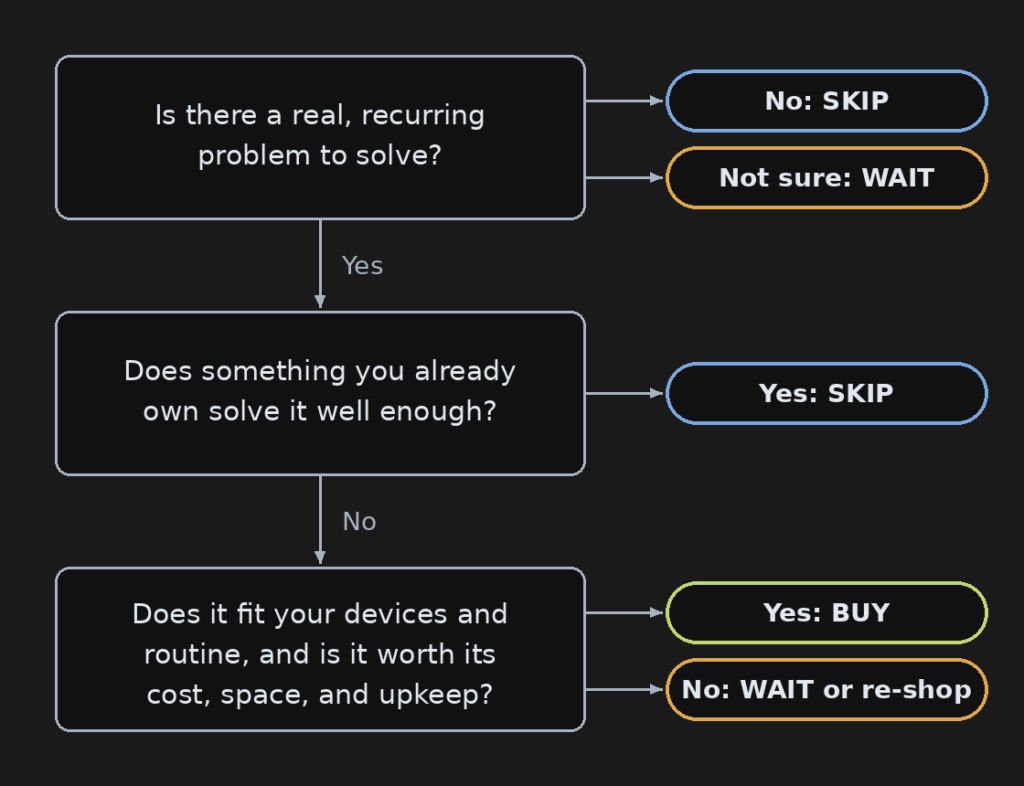
Each run through the test ends in one of three outcomes. They are general decision rules, not universal requirements. In short, a clear problem, nothing owned that solves it, and a good fit point toward buying. An unclear problem or uncertain frequency points toward waiting. An existing solution, or a cost, space, and upkeep burden that outweighs the likely benefit, points toward skipping.
When an Accessory Is Worth Buying
Choose BUY when a specific current problem exists, the accessory addresses it, compatibility is established where it matters, and nothing you own adequately solves it. A broken cable you use every day is the classic case: the problem is obvious and current, and the only open question is whether the replacement matches your device. Confirm those details before you order.
When Waiting Is the Better Decision
Choose WAIT when the need, the frequency, or the practical benefit is uncertain. Waiting is an active decision to gather evidence, not an automatic delay on all spending. For a few weeks, note each time the problem occurs and try an item you already own as a stopgap. If the problem keeps coming back, re-run the test, and the answer will often become a buy. If you forget about it, you have your answer. A few weeks is an editorial suggestion, not a tested interval, and waiting makes no sense when there is nothing to observe, such as a cable that no longer works.
When an Existing Item Is Good Enough
Choose SKIP when something you already own can be repurposed, when the inconvenience is too minor to justify the cost, or when the product would add new complications such as bulk or fussy maintenance. A skip is not permanent. If your circumstances change, run the test again.
The flowchart shows the order of the questions. The table after it applies them to three illustrative scenarios, which are examples for explanation rather than survey results or tested products.
| Situation | Key Question | Likely Decision | Reason |
|---|---|---|---|
| Frayed cable for a primary device | Does this solve a confirmed, recurring problem? | BUY | It replaces a failing daily item, as long as the connector and device requirements match. |
| Desk cable organizer for mild clutter | Is the need clear, or can existing organization do the job? | WAIT | The inconvenience is minor, so note how often it happens before buying. |
| Second minimalist wallet with similar capacity | Does it add anything the current wallet lacks? | SKIP | It duplicates an item you own without solving a new problem. |
4. Apply the Test to Common Everyday Accessories
The examples below show how the same questions play out in four common groups. They illustrate the framework, they are not buying guides, and they name no specific products. For a catalog of accessories sorted by the problem each one solves, see everyday accessories that make daily life more convenient.
Bags and Wallets
A plausible problem: your bag is uncomfortable to carry, or your wallet no longer closes around what you put in it. A new one could help if the fault is a poor fit for your daily load. Before buying, measure the items you carry every day and compare them with listed dimensions and capacity, and check how the strap, handles, and compartments suit the way you carry. Then look at overlap. Another bag or wallet you already own may fit your load with room to spare, and sometimes the real fix is carrying less. If the commute is what you are carrying for, the commuter accessories guide builds a carry kit around how you travel.
Conditional conclusion: BUY if your current one demonstrably fails at a recurring task. WAIT if the main appeal is appearance. SKIP if an item you own already fits and works.
Phone Accessories and Charging Cables
A plausible problem: a cable has frayed, or a phone case no longer fits a new phone. The potential benefit is a working daily charger or a protected phone. The check that matters most is compatibility, and a matching plug shape is not enough. USB-C describes a connector, while charging power is a separate matter: USB-IF describes USB Power Delivery as its own specification, and its higher power levels depend on a full-featured USB-C cable, so a cable that physically fits can still limit charging. Data speed and video support can also differ between cables, which is why USB-IF’s Certified USB logos can show performance, power delivery capability, or both. Look for a stated power rating and data speed, and check your phone maker’s documentation for what your model needs. Cases, mounts, and magnetic accessories are cut for specific models, so confirm your exact model.
Next, empty the drawer. Sorting your existing cables often shows that a working one is already there. The guide to choosing phone accessories goes deeper on charging standards and case fit.
Conditional conclusion: BUY a replacement when yours is broken and compatibility is confirmed. WAIT on extras bought “just in case.” SKIP when a working cable or case you own already does the job.
Cable Organizers and Small-Item Storage
A plausible problem: cables and small items end up tangled at the bottom of a bag or drawer. A pouch or organizer can help, but only if it fits the space where it will live and you can reach what is inside without unpacking everything. Check capacity, how easily you can get items in and out, and how much room the organizer takes up itself.
Storage products can also hide an accumulation problem. Pull everything out first and sort it into what you actually use and what you do not. After sorting, a small number of items may still tangle, and that is a real problem a small organizer can solve. If the pile was mostly spares you never use, a container just stores the clutter.
Conditional conclusion: BUY if sorted, in-use items still tangle. WAIT if the clutter is mild or you have not sorted yet. SKIP if removing surplus items solves it.
Travel Accessories and Wearable Items
A plausible problem: you are uncomfortable or unprepared on trips, or you want something to wear for a season. Think about how often you actually travel, what conditions you face, and what your current luggage and clothing already handle. For wearable items such as scarves, gloves, or hats, add comfort, care, and how many months of the year you would wear them. For travel gear, add packability: each item competes for the same limited bag space.
Overlap is common here, since a seasonal item may duplicate something in a closet. A power bank for travel brings its own airline rules, covered in what to look for when buying a portable charger.
Conditional conclusion: BUY when a specific upcoming trip or season exposes a gap in what you own. WAIT if the trip is hypothetical. SKIP if your current luggage or clothing already meets the need.
5. Avoid the Most Common Unnecessary Accessory Purchases
The patterns below are examples of how purchases become redundant. They are not claims about how often each one happens, and each leads back to a question from the test.
Buying for a Situation That Rarely Happens
Rare-event purchases are often framed as insurance: a gadget for an occasional outdoor trip, or a specialized tool for a task you do once a year. The pressure usually arrives through urgency, such as a limited-time sale or a bundle that makes the extra item feel nearly free. A discount does not change whether you need the item. If the use is rare but real, borrowing, renting, or improvising with what you own may cost less than owning and storing it. If it is a safety or accessibility need, the exception described earlier applies, and owning it may be worth the space.
Replacing an Item That Still Works
Cosmetic wear, such as a scuffed case or a faded strap, does not impair an accessory’s core job. Replacing a working item because a newer version exists, or because a trend has moved on, adds cost and another item to store without removing a problem. Ask what the new one would do that the current one cannot. If the answer is appearance only, that is a legitimate personal reason, but it is a want rather than a fix, and it belongs in the wait column until you have decided it is worth the money.
Adding Accessories Without Solving the Underlying Problem
Organizers, sets, and “complete your kit” bundles can treat a symptom while the cause stays put. A new pouch makes the pile of cables neater without reducing how many cables you own, and a matching accessory for something you rarely use adds one more item to maintain. When a purchase would manage clutter instead of reducing it, return to the problem statement and ask whether fewer items would fix it, as described in the storage example above.
6. Use This Checklist Before Buying an Accessory
Run through these questions at the moment you are tempted to buy, not afterward, and write short answers instead of only thinking them. A written answer is harder to talk yourself out of, and a blank or “I don’t know” shows you exactly where an unnecessary purchase would be hiding. Resolve any unknown before you check out.
- What specific problem does this solve? Describe it in one sentence without naming the product. If you cannot, stop here.
- How often will I use it? Frequent use supports a purchase, and rare use calls for waiting unless it is a travel, accessibility, or safety need.
- Can something I already own do this job? Check for duplication and for repurposing before you look at anything new.
- Is it compatible with my devices, bag, and routine? Confirm dimensions, connectors, and a named model where it matters, using the maker’s documentation for technical items.
- Can I carry and store it easily? Consider bulk, upkeep, and where it will live when you are not using it.
- Is it worth the total cost? Count price, space, maintenance, and likely replacement, not price alone.
- What is my decision: BUY, WAIT, or SKIP? Write it down, and if it is WAIT, note what you will watch for and when you will look again.
Here is a worked example with a hypothetical item. It is illustrative, not a tested result. Say you are considering a padded laptop sleeve. The problem is that the laptop’s corners get scuffed in a backpack with no padded pocket, and it happens on every workday. Nothing you own fits the job well: a folded fleece cushions the laptop, but it takes space and gets forgotten. For compatibility, you compare the laptop’s width, depth, and thickness with the sleeve’s listed interior size, because sleeves are usually sold by screen size and individual models differ. It adds a little bulk but replaces the loose cloth. On cost, the sleeve should last about as long as the laptop, so you look at the stated materials and stitching and read the seller’s return policy. The decision is BUY, with a note to confirm the interior size before ordering. If the laptop already rode in a padded pocket, the same checklist would have ended in SKIP at the third question.
Two habits make the checklist work. First, answer in the same order every time, because the early questions are the cheapest to fail: most unnecessary purchases are caught by the first three. Second, treat a WAIT as a task with an end date. Put a reminder in your calendar, and when it arrives, decide based on what actually happened rather than on how the product looks in a listing.
Name the problem, check what you already own, test the fit, and only then buy, wait, or skip.
7. Sources
Last reviewed: October 19, 2026