When researching a bluetooth tracker iphone android mixed households quickly discover that Apple AirTags cannot be shared across different operating systems. However, alternative item finders like Tile, Pebblebee, and Chipolo offer cross-platform tracking solutions, provided you understand their distinct setup rules and network limitations.
Quick answer
- Verdict: AirTags are strictly iOS-only; Android devices can only receive safety alerts, not track them.
- Simultaneous tracking: Tile works on both iOS and Android at the exact same time by using its own standalone app.
- Native tracking: Pebblebee supports both Apple and Google tracking networks, but forces you to choose one. You must factory reset the tracker to switch operating systems.
- Next step: Review the Setup Matrix below to match your household’s shared items to the correct tracking ecosystem.
Can You Use an Apple AirTag on Android?
The most common mistake in mixed-OS households is purchasing an Apple AirTag with the expectation that an Android user can monitor it. Apple AirTags are fundamentally locked into the iOS ecosystem. They rely entirely on the proprietary Apple Find My network, which utilizes the Bluetooth connections of hundreds of millions of iPhones, iPads, and MacBooks worldwide to ping the tracker’s location.
If you attempt to pair an AirTag with an Android smartphone, the setup process will fail because Android lacks the system-level integration required to assign the tracker to an Apple ID. Furthermore, Android phones cannot utilize the Ultra Wideband (UWB) precision finding feature built into AirTags, even if the Android hardware includes a compatible UWB chip. The two ecosystems do not communicate for item location purposes.
The only interaction an Android device has with an AirTag is strictly for anti-stalking safety. Apple provides an Android application called Tracker Detect, and Google has integrated native unknown tracker alerts into the Android operating system. If an unfamiliar AirTag is separated from its owner and travels with an Android user for an extended period, the Android phone will display a warning alert and allow the user to force the AirTag to play a sound. While this prevents malicious tracking, it provides zero utility for a household trying to share a set of house keys or track a family pet. If an item needs to be monitored by an Android phone, you must look at third-party alternatives.
The “Dual-Network” Catch: Pebblebee and Chipolo
To bridge the gap between operating systems, several hardware manufacturers have introduced “dual-network” trackers. Brands like Pebblebee explicitly advertise that their newer models, such as the Clip, Card, and Tag, are compatible with both the Apple Find My network and the Google Find My Device network. While technically true, this marketing often creates a critical misunderstanding regarding how the hardware is actually set up and shared.
A dual-network tracker cannot broadcast to both the Apple and Google networks simultaneously. During the initial unboxing and setup, the user is forced to make a permanent choice: you must pair the device exclusively to Apple Find My or exclusively to Google Find My Device. Once paired to the Apple network, for instance, the tracker essentially becomes an AirTag equivalent. It will leverage nearby iPhones to update its location, and the Android user in the household will be completely unable to view it on their Google Find Hub.
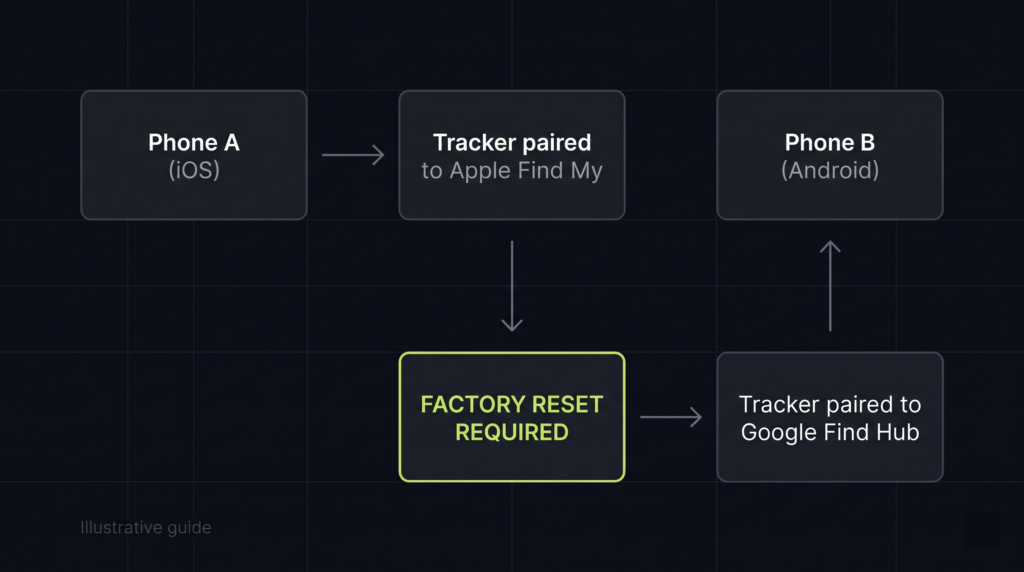
If you decide you want to transfer ownership of that Pebblebee tracker to the Android user, you cannot simply share access through an app. You are required to physically perform a hard factory reset on the tracker itself—usually by rapidly pressing the hardware button multiple times and holding it down until a confirmation beep is heard—and completely remove it from the original Apple ID. Only after this hard wipe can the Android user pair it to their Google account. Chipolo handles this OS divide even more rigidly by selling entirely separate hardware lines: Chipolo Spot models are hardcoded for Apple, while Chipolo Point models are hardcoded for Google.
True Cross-Platform Tracking: The Tile App Network
If your primary goal is for an iPhone user and an Android user to open their respective phones and see the exact same tracker on a map simultaneously, you must abandon the built-in OS networks entirely. Tile remains the only major manufacturer that provides true, simultaneous cross-platform tracking. Tile achieves this by completely bypassing both the Apple Find My and Google Find My Device networks.
Instead of relying on the operating system, Tile requires all users to download its proprietary third-party application. Because the Tile app is available on both the iOS App Store and the Google Play Store, it behaves identically across devices. You simply pair the tracker to the Tile app, and you can then use Tile’s in-app sharing feature to grant location access to another user’s email address. Both the iPhone owner and the Android owner can view the tracker, ring it, and see its last known location without any factory resets or ecosystem barriers.
However, this absolute platform flexibility comes with a significant technical trade-off: network density. When an Apple or Google native tracker is lost in a public space, virtually any modern smartphone that walks past it will silently and securely relay its location to the owner. Tile trackers, conversely, can only be located by other smartphones that actively have the Tile app installed and running in the background. While Tile’s network is robust in dense urban areas, it is mathematically millions of devices smaller than the billion-device networks operated natively by Apple and Google, meaning a lost item in a rural or low-traffic area may take much longer to update its location.
How to Choose the Right Tracker for a Mixed-OS Household
Deciding which ecosystem to invest in ultimately depends on whether the item being tracked is shared or personal. For shared household items—such as a communal set of car keys, the family dog, or a shared television remote—Tile is the most practical choice. It eliminates the friction of OS barriers and ensures anyone in the house can trigger the tracker’s alarm, regardless of what phone is in their pocket. This approach aligns well with how to choose the right phone accessories for practical, daily utility without locking a family into a single tech brand.
For strictly personal items, native-network trackers are vastly superior. If an Android user wants to track their own work backpack, pairing a Pebblebee or Chipolo Point directly to the Google Find My Device network ensures maximum location accuracy if the bag is ever left at a coffee shop. The iPhone user in the same house can simply use an AirTag or a Chipolo Spot for their own luggage. By separating trackers by individual ownership rather than trying to share them, you gain access to the massive, crowdsourced location power of the OS-level networks, which are everyday accessories that add daily convenience and peace of mind when traveling.
| Tracker System | Example Brands | Simultaneous Tracking (iOS & Android)? | Network Relied Upon |
|---|---|---|---|
| Native Apple-Only | AirTag, Chipolo Spot | No (iOS only) | Apple Find My |
| Native Google-Only | Chipolo Point, Moto Tag | No (Android only) | Google Find My Device |
| Switchable Native | Pebblebee | No (Requires factory reset to switch phones) | Apple OR Google (one at a time) |
| Third-Party App | Tile | Yes (Via shared app login) | Tile Network |
Before placing an order, confirm whether you need both people to see the tracker’s location on their own phones simultaneously, as that single requirement dictates whether you must buy a Tile or can use a native-network tracker.
Sources
- Apple Support Community: AirTag functionality on Android devices
- Pebblebee Help: Switching between Google’s Find Hub and Apple Find My
- Tile Blog: Compatibility with Android and Apple iOS devices
- Chipolo Blog: Item Finders as AirTag alternatives for Android
Last reviewed: November 13, 2026