To determine exactly what size laptop sleeve do I need, you must measure your device’s physical width and depth rather than relying on the diagonal screen size. A bare laptop usually requires about 0.5 cm of clearance to slide in and out smoothly. However, if your laptop has thick rubber feet or a hard-shell case attached, the required internal dimensions change entirely.
Quick answer
- Screen sizes (e.g., 13-inch) are diagonal and do not equal laptop width.
- A bare laptop requires 0.5 cm (0.2 in) of clearance added to its physical dimensions.
- Always compare your measurements against the sleeve’s inner dimensions.
- Next step: Measure your laptop’s width, depth, and thickness (including rubber feet).
Why Screen Size Is the Wrong Number
Many buyers assume that if they own a 13-inch laptop, they simply need to purchase a 13-inch sleeve. This is the most common reason protective cases are returned. Screen sizes are measured diagonally across the display panel itself, completely ignoring the physical width, depth, and thickness of the laptop chassis. A “13-inch laptop” does not mean the computer is 13 inches wide; in reality, the physical footprint is often closer to 11.5 or 12.5 inches wide, depending on the manufacturer’s design. When curating how to choose useful everyday accessories, finding a sleeve that perfectly hugs your device is the first step to keeping your bag organized. If you buy a sleeve based purely on the marketed screen size, you will likely end up with a loose, sloppy fit that allows the device to slide around during transit.
Furthermore, modern laptop designs feature significantly shrunken bezels compared to models from a few years ago. This means that a newer 14-inch display is often packed into a chassis that is physically identical to, or even smaller than, an older 13-inch laptop. Because manufacturers label their sleeves based on these generalized screen categories, relying on the marketing name rather than physical geometry will almost guarantee an improper fit. You must base your purchase on the actual measured dimensions of your closed device. To get an accurate baseline, use a standard tape measure rather than a digital spec sheet, as manufacturer specifications sometimes exclude the protrusions of hinges or cooling vents.
Inner vs. Outer Dimensions Explained
When browsing online retailers for a protective case, you will typically encounter two sets of measurements: inner dimensions and outer dimensions. Sleeve fitment relies entirely on the inner dimensions, yet many generic product pages prominently display the outer dimensions to make the product seem larger or more robust. Outer dimensions include the thickness of the exterior fabric, the foam padding, the edge seams, and the zipper track. A sleeve with thick shock-absorbing memory foam might measure 14 inches across the outside but only offer 12.5 inches of usable space inside. If you match your laptop’s width to the outer dimensions of the sleeve, the device will not fit.
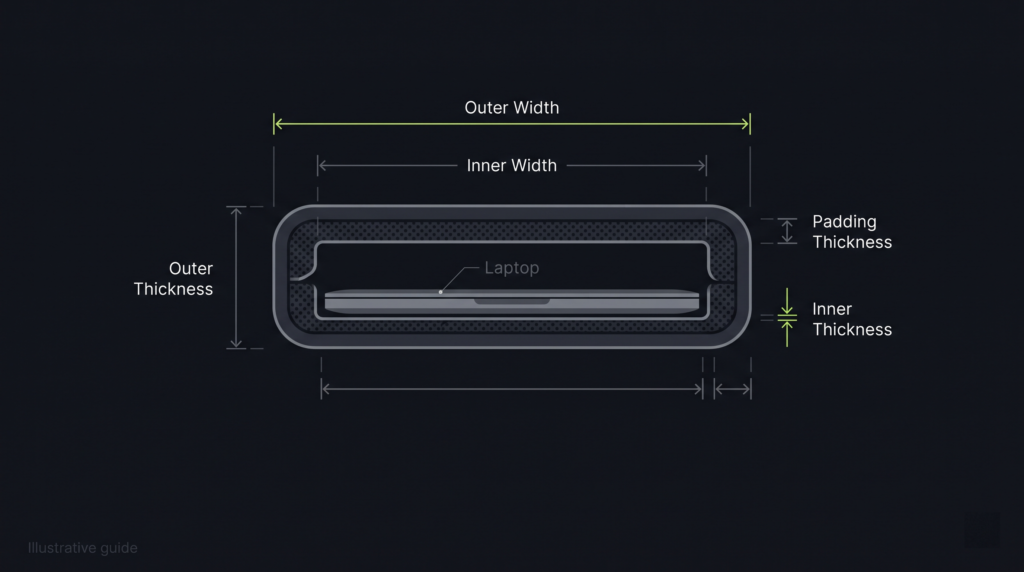
Beyond the basic footprint, chassis thickness is the factor that ruins fits more often than width or depth. Two laptops with identical 15.6-inch screens can have the exact same width but drastically different thicknesses. A slim office ultrabook might measure 0.6 inches thick, while a mobile workstation could be over an inch thick. Because a sleeve is a three-dimensional envelope, a thicker laptop consumes more of the internal width and depth just to stretch the fabric over its top lid. If you do not account for the internal volume lost to thick padding and the vertical height of the device, the zipper will bind or scratch the corners of your computer when you attempt to close it. Always verify that the dimensions listed by the seller explicitly state “internal” or “inner” capacity before making a decision.
The Clearance Calculator Formula
To achieve a tailored fit that is neither too tight to zip nor too loose to protect, you must apply a specific mathematical buffer to your physical measurements. A bare laptop cannot share the exact same dimensions as the sleeve’s inner cavity; it requires a small amount of breathing room to slide in and out smoothly without stressing the zipper seams. If you are building a larger loadout of commuter accessories, a sloppy sleeve will waste valuable space inside your backpack, making precision critical.
The standard baseline rule is to add roughly 0.5 cm (about 0.2 inches) of clearance to your laptop’s physical width and depth. For example, if your closed laptop measures exactly 31.0 cm wide and 21.5 cm deep, your target inner sleeve dimensions should be at least 31.5 cm by 22.0 cm. This calculation assumes you are sliding a bare metal or plastic laptop directly into a fabric-lined sleeve.
| Laptop Condition | Width/Depth Buffer Required | Thickness Buffer Required |
|---|---|---|
| Bare Laptop | Add 0.5 cm (0.2 in) to physical dimensions | Measure including rubber feet; add 0.5 cm |
| Laptop with Hard-Shell Case | Add an extra 0.3 to 0.5 cm (0.1-0.2 in) | Add an extra 0.3 to 0.5 cm on top of case bulk |
This formula changes significantly if you use a protective hard-shell case. Snap-on plastic shells add both physical bulk and a high-friction surface that grips the interior lining of the sleeve. If you keep a hard-shell case attached to your laptop at all times, you must add an additional 0.3 to 0.5 cm (0.1 to 0.2 inches) of clearance to every measurement—width, depth, and thickness. Finally, when measuring your device’s baseline thickness, you must place the laptop on a flat table and measure from the tabletop to the highest point on the lid, ensuring you include the rubber feet on the bottom. Skipping the rubber feet will result in a sleeve that refuses to zip closed at the corners.
Edge Cases: MacBooks, Gaming Laptops, and Hard Shells
Applying the clearance formula is straightforward for standard office laptops, but certain device categories require special attention due to their unique chassis designs. Apple’s modern MacBook lineup frequently causes sizing confusion for buyers upgrading from older generations. Because Apple drastically reduced the screen bezels on recent models, the 14-inch MacBook Pro often features a physical footprint that is identical to or slightly smaller than older 13-inch laptops. Consequently, the 14-inch MacBook Pro easily slides into many standard sleeves that are technically marketed and labeled for 13-inch devices. If you own a modern slim-bezel laptop, you will frequently find your best fit in a sleeve categorized one size smaller than your screen size, provided you follow the 0.5 cm internal clearance rule.
High-performance gaming laptops and mobile workstations present the opposite problem. These machines feature massive rear cooling vents, protruding hinges, and elevated rubber feet designed to maximize airflow. A gaming laptop with a 15.6-inch screen will almost never fit into a standard 15.6-inch sleeve because its rear hinge assembly extends the depth far beyond standard specifications. For these thick chassis designs, you must measure the depth at its absolute widest point near the exhaust vents, and measure the thickness at the rear hinges rather than the tapered front edge. When dealing with extreme thickness, standard neoprene stretch sleeves may not provide enough structural give, meaning you may need to size up your width and depth targets by a full centimeter to allow the fabric to stretch vertically over the machine without ripping.
Before checking out, verify that the retailer’s dimension chart specifically labels the numbers as “internal” or “inner” dimensions, as relying on outer dimensions will result in a sleeve that cannot zip closed.
Sources
Labovarde, Laptop Sleeve Size Guide
FLW Bag, Laptop Sleeve Size Guide: Dimensions & Capacity
Last reviewed: November 13, 2026