Learning how to choose a phone stand starts with matching it to your actual phone, case, workspace, and daily habits, not with picking the most popular model on a retailer site. A stand that looks perfect in a product photo can still tip when you tap the screen, refuse to hold a thick case, or cover the charging port you need.
This guide organizes the decision around three situations: a work desk, travel and commuting, and everyday use at home. For each one, it explains which priorities matter most, how to check fit and charging access before you order, and how to tell a meaningful feature from an expensive extra. The advice is based on how stands are built, on manufacturer and standards information, and on general reasoning about use. It is not based on hands-on product testing, and it does not rank specific products.
If you only take one thing from this guide, make it this: decide where the stand will live, measure your phone with its real case on, and confirm that the charging port stays reachable.
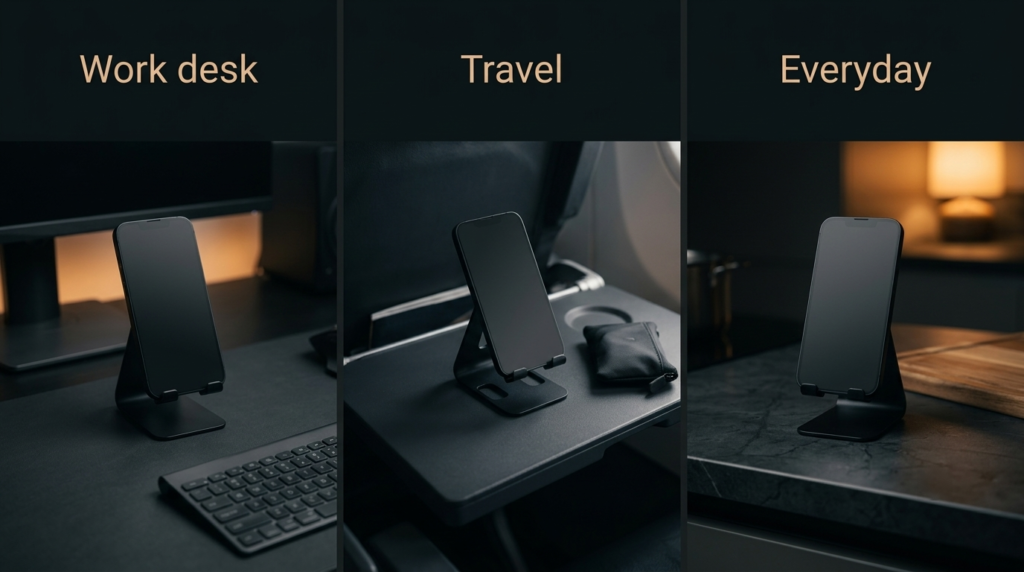
Table of Contents
1. Start With Where You Will Use Your Phone Stand
Before you look at hinges, materials, or charging features, decide where the stand will spend most of its time. One stand can serve more than one place, but each place pushes the design in a different direction, and the features that help in one setting often cost you in another. The three profiles below are general priorities, not rules. Your own desk, bag, and phone may change the answer.
Best priorities for a work desk
A work desk rewards stability above everything else. Typing, tapping, and scrolling nudge the phone constantly, and video calls ask the stand to hold a steady angle for an hour or more. A wide, weighted, or grippy base helps resist wobble, and an adjustable angle lets you raise the screen toward eye level and tilt it away from window or lamp glare. Footprint matters too. A base that is stable but takes up a third of a small desk tends to get pushed aside, so measure the space you can spare. Finally, check that cables can reach the phone without being pinched, since a desk stand often sits beside a laptop, a keyboard, and a charger.
Best priorities for travel and commuting
When you carry a stand, size and weight become the deciding factors. Look at the folded dimensions, whether it slips into a pocket or a bag sleeve without scratching other items, and how many steps it takes to set up on a cramped surface such as an airplane tray table or a hotel nightstand. Compact stands usually give up some height and base area, so they suit lighter use like watching a video or reading a boarding pass, and they may feel less steady under heavy tapping. If you also need power on the road, a stand is only half of the setup, and our guide on what to look for when buying a portable charger covers the other half.
Best priorities for everyday home use
At home, versatility and simplicity usually matter more than precision. A bedside table, a kitchen counter, and a coffee table all offer different surfaces, and smooth stone or polished wood is easier to slide on than a rough or textured one, so non-slip contact points count for more than fancy adjustment. Kitchen use also brings splashes and sticky fingers, so a stand with open, easy-to-wipe surfaces is more practical than one with many crevices. Because the phone may move between portrait and landscape and from room to room, a simple, compact stand that works in several places often beats a specialized one. The table below sets the three profiles side by side.
| Use case | Primary priority | Suitable stand type | Main tradeoff |
|---|---|---|---|
| Work desk | Stability, viewing angles, and cable access | Fixed or adjustable desktop stand | Lacks portability for travel |
| Travel & commuting | Folded size, weight, and packability | Foldable and portable stand | Smaller footprint can reduce tap stability |
| Everyday home use | Versatility, surface grip, and ease of use | Simple desktop or compact multi-surface stand | May lack advanced charging or height adjustment |
2. Check Phone and Case Compatibility Before Buying
Many fit problems are invisible in a product photograph. Photos rarely show the depth of the cradle, the gap under the phone, or how much room a case takes up. Check your setup against the stand’s published dimensions before you order, and remember that a listing that says a stand “fits most phones” is a marketing summary, not a measurement of your phone in your case.
Check phone size, case thickness, and attached grips
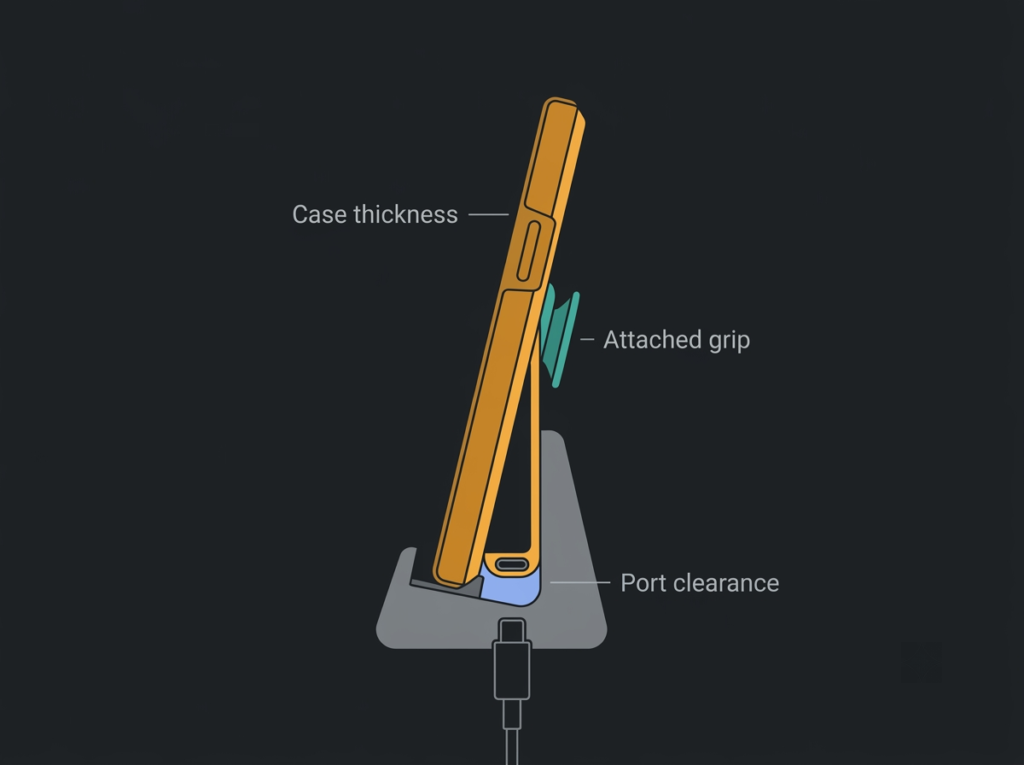
Start by measuring your phone with its case and any attached accessory in place. A thin case adds little, but rugged multi-layer cases, battery cases, wallets, card holders, pop-out grips, and magnetic rings can add noticeable thickness and change where the phone’s weight sits. Compare the measured thickness with the stand’s stated slot or cradle width, and look for a note about supported case thickness or an adjustable cradle. Also consider the lower edge of the phone. Some stands rely on a lip that grips the bottom, and a grip or ring on the back can push the phone off that support or stop it from resting at the intended angle. If a manufacturer lists a maximum case thickness, trust that figure over a general claim. If it does not, treat the fit as unconfirmed and check the return policy before you buy.
Make sure the charging port and cable remain accessible
A stand that holds the phone by its lower edge can block the charging port, which matters if you want to charge while using the phone for a video call or a recipe. Look for an open-bottom design or a cutout that leaves room for a plug, and confirm that the connector on your own cable fits, since right-angle and thicker connectors need more clearance. Also think about cable routing: a cable that exits straight down needs space under the stand, while one that exits sideways needs a gap near the cradle. Port position varies by phone, so compare the stand’s opening with where your port sits when the phone is in the orientation you plan to use.
Understand magnetic compatibility
Magnetic attachment and wireless charging are two different things that often arrive together. Magnets hold the phone in place and line up its charging coil. A charging coil and a power source deliver the power. A magnetic stand with no power connection can hold a phone and do nothing more, and a stand that charges needs a compatible phone and a power adapter as well.
Apple’s MagSafe is built into specific iPhone 12 and later models, and Apple’s MagSafe Charger page says the magnetic alignment experience applies only to those models, while older iPhones can still charge on a Qi charger without it. Qi2 is the Wireless Power Consortium’s newer standard. Its Magnetic Power Profile is based on MagSafe technology that Apple contributed, and the same Qi v2.0 standard includes a separate profile without magnets that keeps the regular Qi logo.
Android support is uneven. According to Android Central, Google’s Pixel 10 series has the magnets built in, with no case required. TechRadar reports that phones described as Qi2 Ready, including the Samsung Galaxy S25 Ultra and OnePlus 13, lack built-in magnets and need a magnetic case or adhesive ring to use magnetic accessories. Lineups change, so treat these as examples from the sources below rather than a complete list. The practical lesson is that “magnetic” does not mean “works with every phone,” and your case counts, because a case without the right magnets can weaken or prevent a magnetic connection. Check the stand’s own compatibility list against your exact phone and case, and confirm whether the stand only holds the phone or also charges it.
3. Evaluate Stability, Adjustability, and Build
Product pages lean on words like “sturdy,” “heavy-duty,” and “ergonomic,” which are hard to compare across listings. You can turn them into questions you can answer from photos, dimensions, and weight. None of the criteria below guarantees that a particular model will not wobble, but they help you spot designs that are more likely to behave.
What makes a phone stand stable?
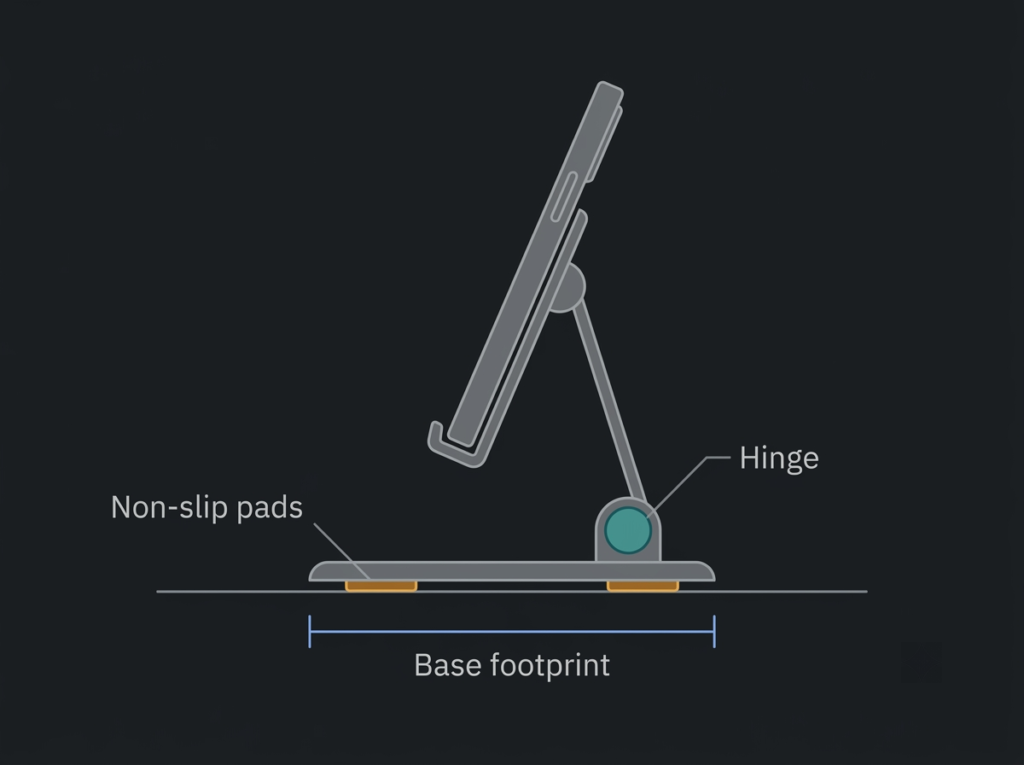
Three physical traits drive stability: base footprint, weight distribution, and friction. A wider base resists tipping because the phone’s weight has to shift farther before the stand rocks over. Weight placed low in the base, whether from a heavier material or a counterweight, lowers the center of gravity and reduces the risk of tipping when you tap near the top of the screen. Friction comes from rubber or silicone feet, which help the stand stay put on a smooth desk, and from pads in the cradle that grip the phone and help keep it from sliding. Support geometry matters as well. A phone leaned back at a shallow angle puts more of its weight over the base than one propped nearly upright on a small foot. A heavy phone in a thick case raises the stakes, because it moves the balance point higher and farther back. Few listings publish tipping tests, so treat claims such as “will not tip” with caution. Look for stated base dimensions and weight instead, and compare them with similar stands.
When adjustable height and angle matter
Adjustability is most useful when more than one task, person, or surface shares the stand. An adjustable angle lets you tilt the screen for typing, reading, or a call, and adjustable height lets you bring the phone closer to eye level. The trade-off is moving parts. A hinge has to hold its position under the phone’s weight, and one that loosens over time lets the screen sag. Look for descriptions of friction or locking hinges, and for buyer reviews that mention loosening, keeping in mind that those are other people’s experiences, not something this guide observed. Adjustment also adds bulk, which hurts portability, and extra joints add flex that can make tapping feel less steady. A fixed-angle stand is simpler and has fewer parts that can work loose, but it asks you to match your posture to the phone. If you only ever use one setup, such as a phone propped at a comfortable angle on a nightstand, a fixed stand is likely enough.
4. Choose Between the Main Types of Phone Stands
Most phone stands fall into three practical families. They overlap, and plenty of products blend traits, but the grouping helps you decide which trade-offs you are willing to accept. None is better overall. Each fits certain routines and frustrates others.
Fixed and adjustable desktop stands
These stands are built to stay on a desk. They are usually made from metal, thicker plastic, or other rigid materials, and many have a wider or weighted base. That generally makes them steadier and leaves more room for a cable, but they are bulkier and heavier to carry. Fixed models hold one angle, while adjustable ones add a hinge or arm so you can change height or tilt. Choose this family when the stand will stay in place and when stability or viewing angle matters more to you than weight in your bag. The cost is portability and, for adjustable versions, a higher chance that a hinge loosens or that the stand crowds a small desk.
Foldable and portable stands
Foldable stands collapse flat or into a small bundle, which is why commuters, students, and travelers favor them. They are usually lighter and often less expensive than desk models. The compromise is a smaller, lighter base, so they tolerate heavy tapping less well, and hinge quality varies from design to design. For watching video, reading, or taking a call on a hotel desk, they can be entirely sufficient. For daily use beside a keyboard, check the specifications for base depth, grip pads, and whether the hinge locks. They also work well as a backup that lives in a bag while a heavier stand stays at your desk.
Magnetic and wireless-charging stands
Magnetic and charging stands attach to a phone with magnets and, in many cases, charge it. They are convenient because the phone snaps into alignment and can often be rotated between portrait and landscape. Compatibility is their main limitation. The phone or case must have the right magnets, and charging requires a power adapter and cable that meet the stand’s needs. They usually cost more and take up more space than a plain stand. Choose one if you already use a magnetic phone or case and want a charging dock on your desk or nightstand, and make sure the product’s listed compatibility names your phone and, if relevant, your case. The compatibility section above explains what to verify before you buy.
5. Use This Checklist to Choose the Right Stand
The explanations above come down to a short decision process: pick your top priority, then confirm the specifications against your actual phone and case. The two steps below turn that into something you can run through on a product page.
Match the stand to your top priority
Pick the one priority that would make you return the stand if it failed, and let that decide the category. If a wobbling phone would ruin your video calls, put stability first and choose a desktop stand with a broad base and grip pads. If the stand has to live in a bag, put folded size and weight first and accept a smaller base. If it will move around the house, put versatility first and look for a compact stand with non-slip feet that works in portrait and landscape. If you rely on a magnetic phone, put compatibility first, because no amount of stability helps if the phone does not attach. When two priorities seem equal, ask which failure is harder to live with. A phone that slips is usually a bigger annoyance than a stand that is a little larger than you wanted.
Check the product specifications before ordering
Read the product page for numbers and conditions rather than adjectives. Look for the supported case thickness or cradle width, the stated weight and folded size, whether the base has non-slip feet, and whether the stand supports portrait and landscape. Check how the charging port and cable are handled. For a magnetic stand, find out whether it only holds the phone or also charges it, and read the list of compatible phones and cases. Then read the return policy, because a fit you cannot confirm from the listing is much easier to resolve if you can send the stand back. Measuring your phone with its case on takes about a minute and answers most of these questions. The table below puts the checks in one place.
| Check | Why it matters | What to look for |
|---|---|---|
| Case fit & thickness | Thick cases or grips can cause the phone to slip off narrow ledges. | Compare the cradle lip depth and width with your phone’s dimensions with its case attached. |
| Charging access | A blocked port prevents charging while the phone is propped up. | Look for an open-bottom cutout or cable channel. |
| Base stability | Light, narrow bases can tip or slide when you tap or swipe. | Look for a broad footprint, some weight, and non-slip feet. |
| Orientation support | Video and some calls work better in landscape. | Confirm the stand holds the phone horizontally without blocking the screen or port. |
| Magnetic requirements | Magnetic holding depends on matching hardware and does not by itself mean wireless charging. | Check the stand’s listed compatibility against your exact phone and case, and whether it charges or only holds. |
| Portability | Bulky stands take up bag space. | Check folded size and weight, and look for a hinge that locks in position. |
6. When You Do Not Need a More Expensive Phone Stand
A phone stand is a simple tool, and many extra features add cost without changing how you actually use the phone. The goal is to pay for what solves your problem and skip the rest. Two questions help: what specific problem would this feature solve for me, and is a stand the right accessory at all?
When a simple stand is enough
A basic stand is often enough when the phone stays in one place and one angle works. If it sits on a home-office desk, a fixed-angle or lightly adjustable stand can hold it steadily, and a multi-axis metal arm or a built-in charging dock adds cost and clutter you may never use. If you only need a prop for watching a video or following a recipe in the kitchen, an inexpensive foldable stand is typically sufficient. Charging is another place to hold back. If you are happy plugging in a cable, a stand with an open port gives you charging access without paying for wireless charging, a power adapter, and a compatible phone or case. Spend more only when you can name the problem a feature solves, such as a loose hinge, a case that does not fit, or a stand that keeps sliding.
When a different mount or accessory makes more sense
A stand is designed for a stable surface like a desk, table, or counter. For navigation while driving, you need a mount made for a vehicle, such as a dashboard or air-vent mount, not a desk stand. For secure one-handed holding or for use while walking, a phone grip or strap is the better accessory, because it attaches to the phone itself. If you plan to record video or keep heavier equipment steady, a tripod or mounting rig built for that load is a better fit than a casual desk stand, and those products come with their own weight ratings. For help sorting out accessories more broadly, see how to choose the right phone accessories for everyday use.
7. Frequently Asked Questions
Will a phone stand work with a thick case?
Sometimes. Fit depends on how wide and deep the cradle slot is and on where a grip or ring sits on the back of the phone. Measure the phone with its case and compare it with the slot width in the listing. If no case limit is stated, look for an adjustable cradle or a flat-backed design that props the phone against a surface instead of pinching it, or ask the seller. A pop-out grip often prevents flat resting, so a stand with a wide opening may suit it better.
Can a phone stand be used while charging?
Yes, if the stand leaves the charging port open, because you can plug in a cable while the phone stands upright. Wireless charging is different. The stand itself must be a charger, the phone must support wireless charging, and the stand needs its own power connection. Case thickness and attached accessories may affect wireless charging, so read the stand’s instructions for any listed limits before assuming it will work through a heavy case.
Does a magnetic phone stand work with every phone?
No. A phone without built-in magnets can sometimes use a magnetic case or an adhesive magnetic ring, but then compatibility depends on that case or ring, and a ring alone adds holding, not wireless charging. Wording like “Qi2” or “MagSafe compatible” on a listing is not a guarantee for your phone, so look for your exact model in the stand’s compatibility list.
Is a foldable phone stand stable enough for a desk?
It can be, depending on use. Reading, video, and calls are manageable for many foldable stands, while heavy tapping beside a keyboard is where a small, light base is most likely to shift. Check base depth, grip pads, and whether the hinge locks. If a foldable stand still slides on your desk, a non-slip mat underneath can add friction.
8. Sources
- Wireless Power Consortium: Qi v2.0 certification news release (November 15, 2023), for the Magnetic Power Profile and the non-magnetic Extended Power Profile.
- Apple: MagSafe Charger product page, for which iPhone models the magnetic alignment applies to and Qi charging for older iPhones.
- Android Central: Google Pixelsnap hands-on, for built-in magnets on the Pixel 10 series.
- TechRadar: Google brings MagSafe-style accessories to Android with Pixelsnap, for Qi2 Ready phones that need a magnetic case or adhesive ring.
Last reviewed: October 15, 2026