The exact ps5 m.2 ssd requirements demand a PCIe Gen4x4 drive between 250GB and 8TB, a sequential read speed of at least 5,500MB/s, and a heatsink no thicker than 11.25mm. While many older articles still cite a 4TB maximum, Sony’s firmware updates have officially expanded this capacity. However, you must be careful with budget drives: the console enforces asymmetrical heatsink clearances and entirely lacks support for Host Memory Buffer (HMB), meaning DRAM-less drives will suffer severe performance drops.
Quick answer
- Verdict: You must use a Gen4x4 drive with an independent DRAM cache and a heatsink strictly under 2.45mm below the board.
- Official PlayStation Hardware Support Limits
- Check the exact physical dimensions of your chosen heatsink before purchasing, avoiding symmetrical PC coolers with thick bottom plates.
| Specification | Requirement | Note |
|---|---|---|
| Interface | PCIe Gen4x4 (M.2 NVMe) | SATA and Gen3 drives are entirely unsupported and will not format. |
| Capacity | 250GB to 8TB | The 4TB limit is outdated; Sony firmware expanded this to 8TB. |
| Speed | 5,500MB/s or faster | Official recommended baseline to prevent texture pop-in during gameplay. |
| Heatsink Limit | Max 11.25mm total | Must not exceed 8.0mm above the board and 2.45mm below the board. |
| HMB Support | Not Supported | The console architecture requires a drive with an independent DRAM cache. |
What Are the Core PS5 M.2 SSD Requirements?
When upgrading your console’s internal storage, selecting a drive with the correct baseline specifications is the only way to ensure the system boots and formats the drive without errors. The most rigid hardware requirement is the connection interface: the console strictly requires a PCIe Gen4x4 M.2 NVMe SSD. If you attempt to install a slower PCIe Gen3 drive, or any standard M.2 SATA SSD, the motherboard controller will reject it entirely. You will simply be greeted by a startup warning screen that prevents the console from booting until the incompatible drive is physically removed.
One of the most persistent points of confusion in the hardware community surrounds the maximum storage capacity limit. When the console first launched, system firmware restricted internal expansion drives to a maximum of 4TB. However, Sony released a major system update that officially doubled this ceiling to 8TB. As long as the module meets the Gen4x4 standard, you can install any capacity ranging from a modest 250GB all the way up to an 8TB model without relying on external USB storage for your native next-gen games.
In terms of data throughput, the console manufacturer recommends a sequential read speed of 5,500MB/s or faster. While some budget Gen4 drives operating at 3,500MB/s or 4,000MB/s might technically pass the initial formatting benchmark and allow you to play, dipping below the 5,500MB/s threshold introduces significant performance risks. Modern titles are engineered to stream massive high-resolution assets directly from the SSD to the GPU in real-time. If the drive cannot feed data fast enough, you may experience longer loading screens, severe texture pop-in during fast-paced movement, or audio desynchronization. If you are planning broader gaming setup upgrades, verifying this internal speed compatibility is just as critical as selecting your external gear.
The Strict Heatsink Limits (Above vs. Below the Board)
Adding an M.2 NVMe SSD to your console requires a dedicated cooling solution. The Gen4 memory controllers operate at incredibly high temperatures, and a bare drive running under heavy gaming loads will rapidly thermal throttle, crippling its data transfer speed to prevent melting. While you can purchase a drive with a pre-installed factory heatsink or attach a third-party cooler yourself, the physical clearances inside the console’s internal expansion bay are incredibly rigid and unforgiving.
The absolute maximum total thickness for the SSD and its heatsink combined is 11.25mm, but you cannot simply buy any PC heatsink that measures under this total thickness. The expansion slot clearance is heavily asymmetrical. The metal bay allows for up to 8.0mm of heatsink material from above the circuit board, but it strictly limits the clearance to an incredibly shallow 2.45mm from below the board. If the top section exceeds 8.0mm, the metal expansion slot cover will not screw down flat, reducing internal air pressure and disrupting the console’s carefully engineered airflow dynamics.
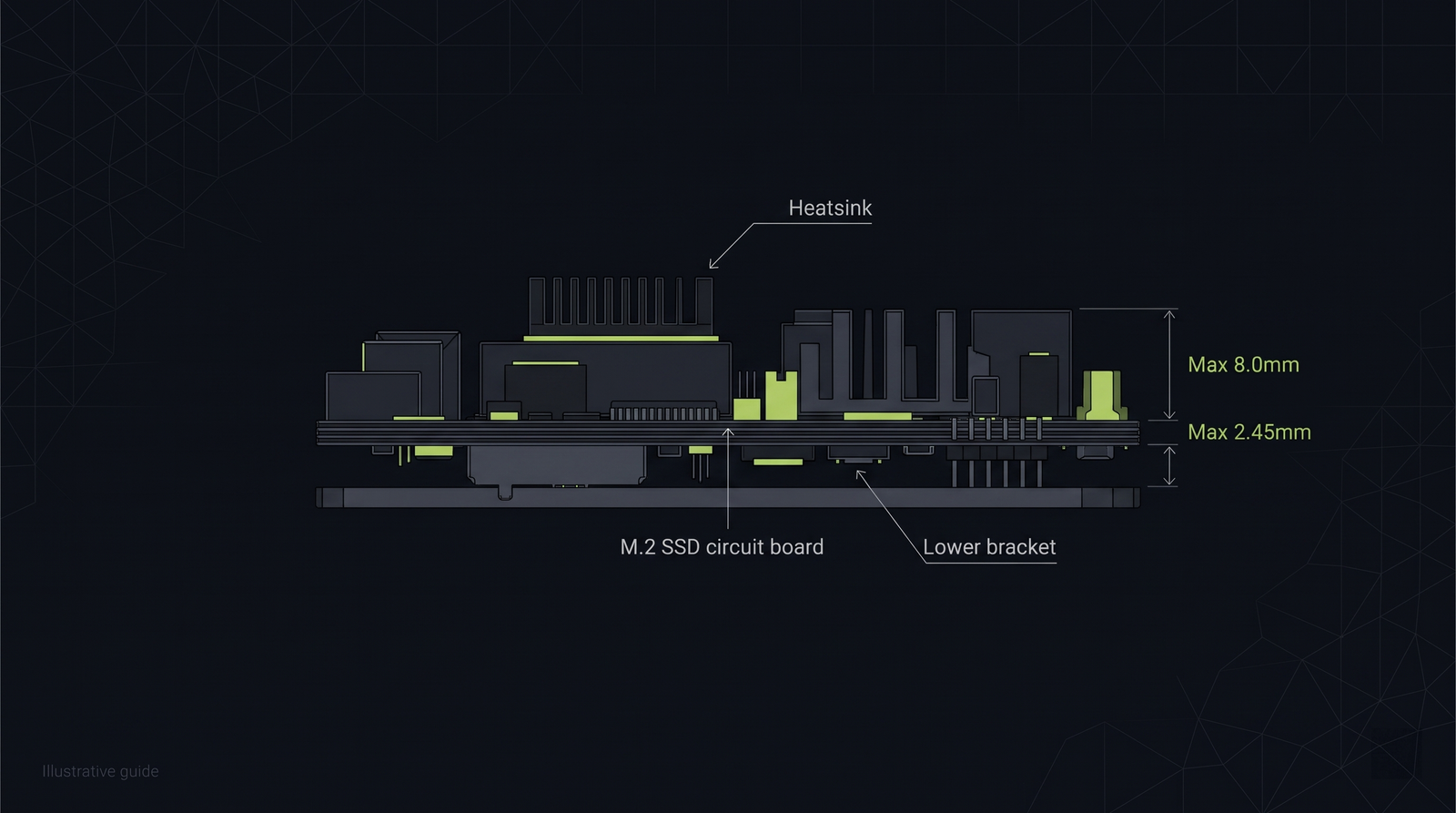
The tight bottom clearance is precisely where most standard desktop PC coolers fail. Desktop motherboards use elevated standoffs, allowing aftermarket heatsinks to utilize thick, U-shaped bottom plates that wrap entirely around the drive. Because the console’s expansion bay floor is completely flat and shallow, these standard symmetrical bottom plates easily exceed the 2.45mm limit. If the bottom bracket is too thick, the SSD will sit at an upward angle and fail to slide into the M.2 connector properly. Attempting to force the drive down into the slot in this state will physically bend the circuit board and permanently damage the connector pins. Always scrutinize the precise millimeter breakdown of an aftermarket heatsink before buying to ensure the bottom tray is virtually paper-thin.
Why You Must Avoid HMB Drives in a PS5
Beyond the physical heatsink dimensions and basic interface speeds, there is a hidden technical trap that catches many buyers: Host Memory Buffer, or HMB. To understand this, you must look at how SSDs map data. A high-performance SSD uses a Flash Translation Layer (FTL) to instantly locate exactly where your game files are stored on the NAND flash chips. Premium SSDs include a dedicated onboard DRAM cache chip specifically to store this map, allowing for lightning-fast data retrieval.
In the PC market, manufacturers produce budget-friendly PCIe Gen4 SSDs that completely remove this expensive onboard DRAM chip to lower the retail price. To maintain fast performance without their own cache, these DRAM-less drives rely on HMB technology, which allows the SSD to “borrow” a small portion of the host computer’s system RAM over the PCIe bus to store the mapping table.
The critical incompatibility lies in the console’s unique architecture. The console uses a unified memory pool (GDDR6) shared between the CPU and GPU, and the operating system explicitly blocks the M.2 expansion slot from utilizing this system RAM as a host buffer. The console does not support HMB under any circumstances. When you install a DRAM-less HMB drive, it is forced to operate entirely without a fast memory cache. This causes severe performance degradation: write speeds will plummet during massive game updates, load times will stretch out, and the drive will stutter noticeably when the system tries to download patches in the background while you play. To ensure a smooth experience, you must explicitly search for an M.2 NVMe SSD that advertises an independent DRAM cache. Just as you might need to connect a PS5 controller to PC and mobile devices to maximize its utility, pairing your console with the exact right storage hardware maximizes your system’s overall lifespan and performance.
Always double-check the heatsink’s bottom clearance specifically, as standard desktop PC heatsinks often exceed the console’s strict 2.45mm limit under the board.
Sources
Last reviewed: November 11, 2026