The right USB-C charger for laptop use is one rated at or above the wattage printed on your laptop’s original charger: thin-and-light laptops typically need 45W to 65W, while high-performance models need 100W or more. A higher rating is not a risk with a compliant charger, because the laptop and charger agree on a power level through USB Power Delivery (USB PD) and the laptop draws only what it is built to accept. A lower rating is the real problem, because it leads to slow charging or a battery that cannot keep up under load.
Quick answer
- Condition: choose a charger at or above the wattage on your original charger’s label, and confirm the laptop can charge over USB-C at all.
- Standards source: USB Promoter Group announcement of USB Power Delivery 3.1.
- Next step: run the four-step label check below before you buy.
Understanding Laptop USB-C Power Requirements
A laptop’s power requirement is a ceiling the charger has to meet, not a number the charger pushes into the laptop. Charging power is volts multiplied by amps, and USB PD lets the charger and the laptop settle on a voltage and current that both support. Before USB PD 3.1, the standard stopped at 100W, which is 20V at 5A. The 3.1 revision announced by the USB Promoter Group added 28V, 36V, and 48V levels that reach up to 240W. A laptop only uses those higher levels if it was built to request them, so the rating on your own charger label matters more than the top of the standard.
Published sizing guidance gives a rough map. Charger maker Innergie places thin-and-light laptops and ultrabooks at 45W to 65W and high-performance laptops, including some gaming models, at 100W or more, and Anker notes that many USB-C laptops need 65W, 100W, or more. The table below turns those ranges into a lookup. Treat it as a starting point rather than a rule, because two laptops in the same category can carry different ratings, and the label on the charger that shipped with yours is the authority. Anker also points out that no single wattage makes a charger “fast” for every device: 30W can be fast for many phones, while a laptop may need 65W or more to reach its intended charging speed.
| Laptop category | Recommended wattage | Typical devices | Power behavior |
|---|---|---|---|
| Ultrabook or thin-and-light | 45W–65W | Thin-and-light laptops and ultrabooks that charge over USB-C | Inside the standard USB PD range. Above 60W, the cable needs a 5A e-marker. |
| Mid-range or business | 65W–100W | Laptops that fall between the other two categories (an editorial bridge, not a published class) | Still inside the standard range, which ends at 100W (20V at 5A). Needs a 5A e-marked cable. |
| Performance, gaming, or workstation | 100W or more | High-performance laptops, including some gaming models | Above 100W, the charger, cable, and laptop all need extended-range support. Some high-power laptops ship with a non-USB-C charger. |
The middle row is an editorial bridge between the two sourced ranges, not a published class, and it exists because laptops do not sort neatly into two groups. If your own label falls between rows or outside them, follow the label. The last row is also where the difference between standard and extended power starts to matter, which the section on USB PD limits explains.
The Myth of Overpowering: Can a Higher-Wattage Charger Harm Your Battery?
The common fear is that a 100W charger will push too much power into a laptop rated for less. That picture treats wattage as pressure applied by the charger, but USB PD works the other way around. When the two devices connect, the charger lists the power levels it can supply, and the device picks one that it supports. Anker’s explanation makes the same point with a phone: a compatible 100W USB-C charger can charge a 20W or 30W phone, because the 100W rating is the charger’s maximum capability and the phone requests the level it needs. A laptop follows the same logic, and a higher-wattage charger cannot make any device exceed its own charging limit.
That has a practical consequence that is easy to miss: extra wattage buys no extra speed. A laptop that accepts at most 65W should charge at the same rate from a 65W charger and from a 100W charger, assuming both work as designed. This is editorial reasoning from the device-limit rule, not a measurement. It means the case for a higher rating is flexibility rather than speed, such as one charger that can also serve a second laptop with bigger demands, or a charger you keep when you replace the laptop. If neither applies, a charger that matches the label is the simpler choice.
The reassurance has conditions. It describes chargers that follow the USB PD standard and are in good condition, and it does not cover a damaged or poorly made unit. The USB Promoter Group notes that safety requirements for products in the 100W to 240W range are more stringent than for lower-power products and are set by the regulations of each country where the product is sold, so look for the regulatory markings your region expects on the housing and buy from a seller with clear return terms. Stop using any charger or cable that is cracked, scorched, sparking, or unusually hot; that advice comes from the charity Electrical Safety First, as relayed by Anker, and it applies at any wattage.
When a charger and a laptop cannot agree on a power level, the usual outcome is the opposite of damage. The connection falls back to a lower level, so the laptop charges slowly or not at all, a behavior Electrical Safety First describes as part of the digital handshake. If a new charger delivers less than you expected, treat it as a compatibility or cable question and check the label, the cable rating, and the laptop’s USB-C limit before assuming the charger is faulty.
The Four-Step Laptop Power Sizing and Adapter Label Inspection Procedure
This procedure turns the label on your current charger into a wattage target for a USB-C replacement. It is an editorial method built from the power equation and the device-limit rule described above, not a manufacturer procedure. Each step has a failure case, so read the notes before skipping ahead.
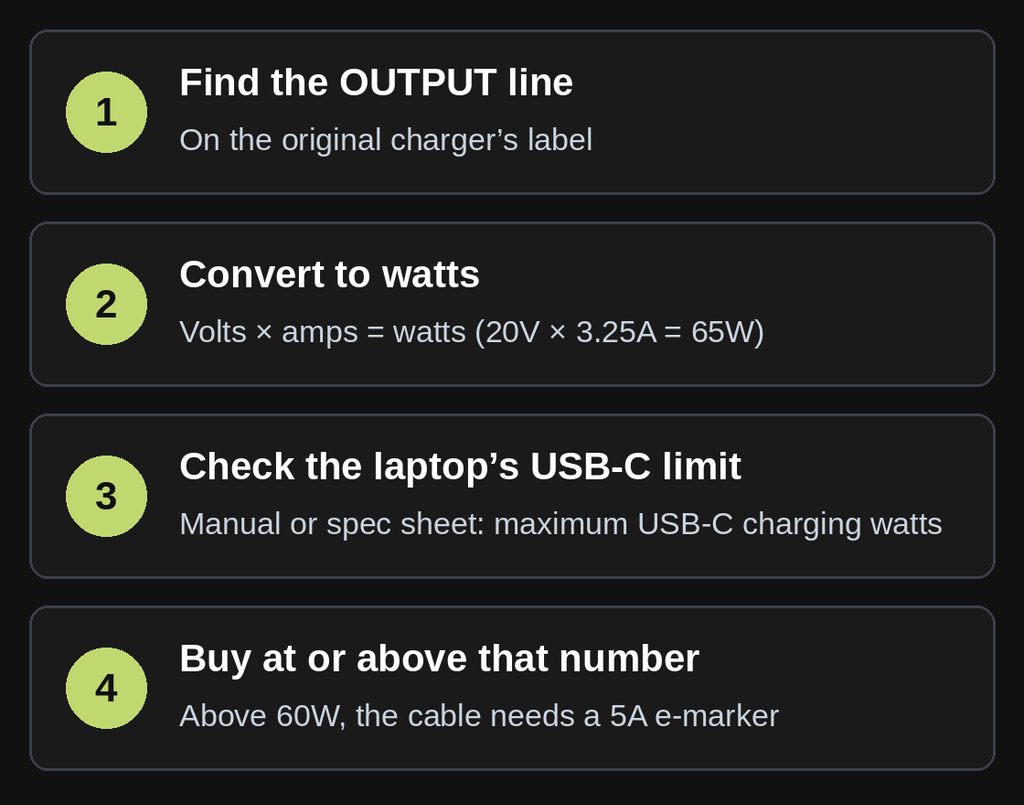
- Find the output line. Turn the original charger over and look for the line that starts with Output, usually printed in small type beside an Input line. Ignore the Input line, which describes the wall side. If the output line already shows a wattage, such as 65W, you have your number and can go to step 3.
- Convert volts and amps to watts. Multiply the output voltage by the output current. An output of 20V and 3.25A gives 65W. If the label lists several voltage and current pairs, which is common on USB PD chargers, calculate each pair and use the highest result: a label listing 5V/3A, 9V/3A, 15V/3A, and 20V/5A tops out at 100W. That label is an illustration, not a specific product.
- Confirm the laptop charges over USB-C and note its limit. A battery symbol next to a port usually marks one that can charge the device, and the manual or spec sheet is the final word. If the laptop has no USB-C charging port, a USB-C charger cannot replace the original. If it does, look for the maximum USB-C charging wattage. It can be lower than the original charger’s rating, and because a charger cannot push a device past its own limit, that lower number becomes your target.
- Choose at or above the target, and match the cable. A charger at the target wattage is the minimum, and one rating higher is a reasonable margin if you want flexibility, as the overpowering section explains. Standard USB-C cables commonly support up to 60W, so a target above 60W needs a 5A e-marked cable, and a target above 100W needs extended-range support in both the charger and the cable.
If you no longer have the original charger
Look for the rated charger wattage in the laptop’s manual or on the maker’s spec sheet for your exact model number. If neither is available, do not guess downward: pick the tier in the table above that matches your laptop class, and confirm that the charger lists USB PD support before you rely on it.
Avoiding Underpowered Chargers and Understanding USB PD Limits
An underpowered charger rarely fails dramatically. It usually connects, reports charging, and then delivers less than the laptop wants. Anker notes that a laptop expecting 65W or more treats a 30W charger as a lower-power option. The effect is clearest under load: when the laptop uses more power than the charger supplies, the battery covers the difference, so the percentage can stall or fall while the charger is plugged in. This follows from simple supply and demand, and it is why heavy workloads expose a weak charger first.
Wattage on the charger is only one link in the chain. Fast charging works only when the charger, the cable, the port, and the device all support the required power, and the weakest link sets the ceiling. The cable is the most common hidden limit: standard USB-C cables commonly support up to 60W, while charging above 60W requires a 5A cable with an electronic marker that reports its rating. USB-IF now labels certified USB-C cables as 60W or 240W, so a cable marked 240W covers any laptop tier.
USB PD limits matter most at the top of the table. The standard range ends at 100W, and charging above that requires the extended range introduced in USB PD 3.1, which adds fixed voltages of 28V, 36V, and 48V. The USB Promoter Group’s announcement also notes that the USB Type-C specification was updated to define 240W cable requirements. In practice, a laptop above 100W needs three matching parts: an extended-range charger, a cable rated for it, and a laptop designed to request that power. A 100W charger on such a laptop is not a safety problem, but it will supply less than the laptop was designed for.
If you travel with the charger, two regional checks come before wattage. Wall plug shapes differ by country, and a plug adapter alone does not change the voltage. Read the Input line on the charger: Dell’s support guidance says a label showing 100–240V means the adapter works worldwide with only a plug adapter, while a single-voltage label also needs a voltage converter. Safety requirements are set country by country, as noted above, so treat any retailer listing as specific to that marketplace.
Your Next Step
For cable ratings, e-marker chips, and port icons in more detail, read USB-C Explained: Understanding Connectors, Cables, and Charging. If you plan to charge from a power bank on the road, what to look for when buying a portable charger covers the checks before you buy. On the day you buy, confirm that the product page lists USB Power Delivery and the wattage you need for the single port you will use, because a total across several ports says nothing about what one port delivers.
Sources
- USB Promoter Group, “USB Promoter Group Announces USB Power Delivery Specification Revision 3.1” (standards body announcement)
- Anker, “What Is a Fast Charger?” (manufacturer blog, used for the power equation, negotiation, and cable ratings)
- Innergie, guide to choosing a fast-charging laptop charger (manufacturer blog, used for laptop wattage ranges)
- Dell Support, “Using Your Dell Laptop Charger Internationally” (manufacturer support page, used for input voltage)
Last reviewed: November 5, 2026