The core distinction in USB-C PD vs PPS charging is that Programmable Power Supply (PPS) is not a rival charging standard—it is an optional adjustable-voltage, current-limited mode operating inside the USB Power Delivery (USB PD) specification. While standard USB PD delivers power through stepped fixed voltage and current profiles, a high-wattage wall charger can still fail to trigger a smartphone’s fastest charging tier if it omits the specific PPS profile that handset requires. This guide breaks down how fixed Power Data Objects (PDOs) differ from PPS negotiation, how to decode charger output labels, and how cable ratings and device generations govern real-world wattage.
Quick answer
- Core distinction: USB PD is the overarching power-negotiation standard, whereas PPS is an optional mode inside USB PD that lets a device request intermediate voltages with active current limiting.
- Official references: USB-IF USB Power Delivery Overview and Samsung Galaxy Charger Compatibility Guide.
- Key compatibility limit: High headline wattage alone does not trigger PPS-dependent fast charging—if a phone requests a PPS profile the charger omits, power falls back to a slower fixed tier.
- Immediate check: Read the fine-print output table on the charger housing for a hyphenated PPS voltage range rather than relying on the headline wattage or a generic PD badge.
Why High-Wattage USB-C PD Chargers Fail to Trigger Fast Charging
PPS Is a Mode Inside USB PD, Not a Competing Standard
Much of the confusion around USB-C PD vs PPS charging comes from retail shorthand. Store listings routinely split “PD chargers” and “PPS chargers” into separate feature tags, making the two terms look like rival ecosystems. Electrically, every compliant PPS wall adapter is a USB Power Delivery charger—the technically accurate description is USB PD with PPS.
Compatibility failures usually appear when a user connects a PPS-dependent smartphone to a high-output USB-C PD laptop adapter that was engineered without PPS ranges. Samsung states directly in its official Galaxy charging documentation that even when an adapter advertises a high maximum output, Super Fast Charging may not be available if the charger does not support PPS. For instance, Samsung defines its 25 W Super Fast Charging mode specifically as USB-C Power Delivery with PPS rather than standard fixed-voltage USB PD.
Equally important, PPS does not universally make every phone or laptop charge faster. Charging speed depends on whether the connected device’s internal power-management controller is designed to request a PPS profile, as well as the battery’s current state of charge and thermal ceiling. Hardware engineered around fixed USB PD rails ignores PPS entries entirely and negotiates standard fixed profiles instead.
The Three-Constraint Ceiling Behind Every Charging Session
A charger’s headline wattage is an upper capability rating, never a guaranteed charging speed. Every time you plug in a USB-C cable, the power source advertises its supported electrical profiles and the receiving device (sink) requests a mutually supported operating point. The electrical ceiling of that negotiated contract follows a straightforward power equation:
Maximum Electrical Power (W) = Negotiated Voltage (V) × Negotiated Current (A)
In real-world operation, the active power ceiling is strictly capped by the lowest of three independent hardware constraints:
- Charger profile limit: The exact fixed PDO rails and optional PPS voltage-current windows programmed into the wall adapter’s USB-C controller.
- Device request limit: The specific voltage and amperage envelope the phone, tablet, or laptop is programmed to ask for at its current battery temperature and charge percentage.
- Cable current rating: The maximum amperage the USB-C to USB-C cable is constructed and electronically marked to carry safely.
Whenever any single link in that chain lacks a required capability—such as a large laptop brick missing a phone’s PPS window or a cable rated below the requested current—digital negotiation steps down to the highest profile all three components share. That lowest-common-denominator fallback explains why a physically larger, higher-wattage USB-C brick can charge a phone noticeably slower than a compact adapter that carries the exact PPS profile the handset expects.
How Fixed USB PD Profiles (PDOs) Differ From PPS Voltage and Current Control
Fixed PDOs vs. PPS Programmable Voltage and Current Limits
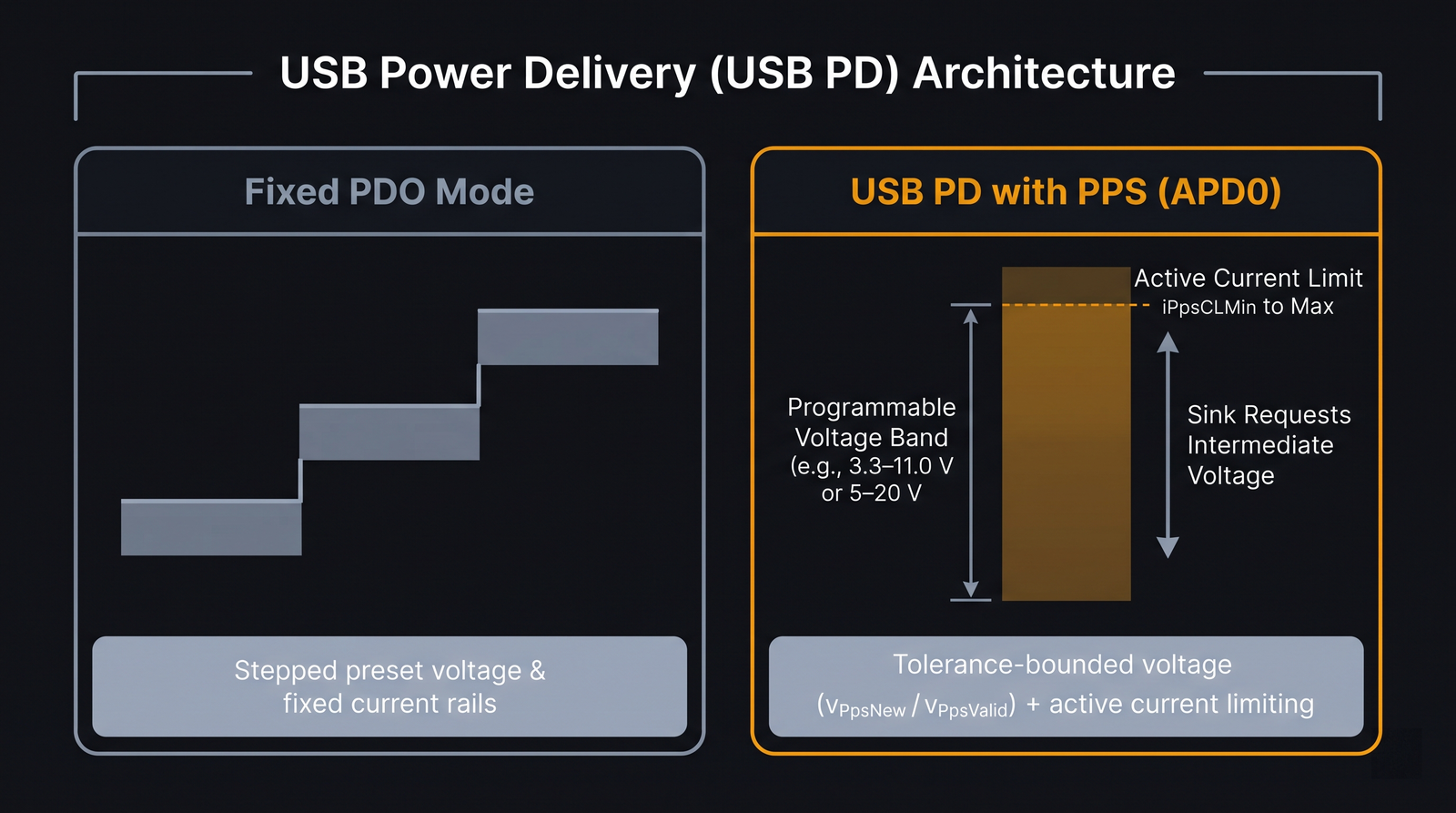
Under the USB Implementers Forum (USB-IF) framework—whose active specification library lists USB Power Delivery Specification Revision 3.3, Version 1.0—USB PD enables flexible power delivery alongside data over a single USB Type-C cable. In standard fixed-profile operation, a charger broadcasts discrete presets called Power Data Objects (PDOs). Each fixed PDO pairs one preset voltage rail with a fixed maximum current ceiling, forcing the connected device to step between discrete voltage levels and handle any intermediate voltage conversion inside the device itself.
PPS changes that negotiation model by advertising an Augmented Power Data Object (APDO)—a bounded programmable voltage window rather than a single locked rail. Through USB PD’s adjustable-voltage supply capability, a compatible sink can request intermediate voltages inside the source’s advertised envelope while keeping voltage and current aligned with its battery charging circuit.
According to the USB-IF USB-C Source Power Test Specification, PPS compliance enforces two strict electrical controls on the charger that standard fixed PDOs do not provide:
- Tolerance-bounded voltage transitions: When a device requests a new voltage inside the PPS range, the source’s output voltage must stay within defined relative and absolute tolerance envelopes (specified as
vPpsNewandvPpsValid) throughout the transition and steady-state window. - Programmable active current limiting: A compliant PPS source must support current-limit programmability between its minimum current-limit threshold (
iPpsCLMin) and its advertised maximum APDO current, maintaining controlled output behavior if the connected device attempts to draw above the negotiated Operating Current.
| Charging Mode | Voltage Behavior | Current and Power Control | Verified Spec Reference |
|---|---|---|---|
| Standard USB PD (Fixed PDO) | Discrete preset rails (5 V, 9 V, 15 V, 20 V; plus 28 V, 36 V, and 48 V in PD 3.1) | Fixed maximum current per preset profile; up to 240 W under PD 3.1 with a full-featured cable | USB-IF USB PD Overview & PD 3.1 fixed-voltage specification |
| USB PD with PPS (APDO) | Device-requested intermediate voltages across a bounded window within strict transition tolerances (vPpsNew / vPpsValid) | Source enforces active current limiting programmable between iPpsCLMin and max APDO current | USB-IF USB-C Source Power Test Specification (V1.2 / 2021) |
| USB PD 3.1 Adjustable Voltage (High-Power) | Adjustable range from 15 V up to the charger’s maximum fixed voltage at 100 mV resolution | Operates within the PD 3.1 Extended Power Range framework for high-power devices | USB-IF PD 3.1 DevUpdate Announcement & PD Rev 3.3 Ver 1.0 library |
Where USB PD 3.1 High-Power Adjustable Voltage Fits In
A frequent technical misconception is treating USB PD 3.1’s high-power adjustable-voltage capability as automatic proof of smartphone PPS support. USB PD 3.1 introduces higher fixed voltage rails enabling 140 W, 180 W, and 240 W power tiers over a full-featured USB Type-C cable and connector. Alongside those high-voltage rails, the USB Promoter Group’s PD 3.1 announcement specifies an adjustable-voltage mode spanning from 15 V up to the charger’s maximum available fixed voltage at 100 mV resolution.
That higher-voltage floor is built for power-hungry multi-cell hardware such as mobile workstations, gaming laptops, and desktop docks rather than smartphones that negotiate programmable ranges below 11 V. Because specification revisions such as PD 3.0, PD 3.1, and PD 3.3 define optional features rather than mandating every voltage window on every port, seeing a newer PD revision printed on retail packaging never substitutes for confirming an explicit PPS line in the adapter’s output specifications.
How to Decode Charger Labels and Verify PD and PPS Compatibility
You do not need a USB inline power meter to determine whether an adapter supports PPS. The electrical capabilities are printed directly in the fine-print output table molded onto the charger casing or published in the manufacturer’s support sheet—you only need to separate fixed PDO lines from hyphenated PPS ranges.
Reading Real-World Charger Output Tables
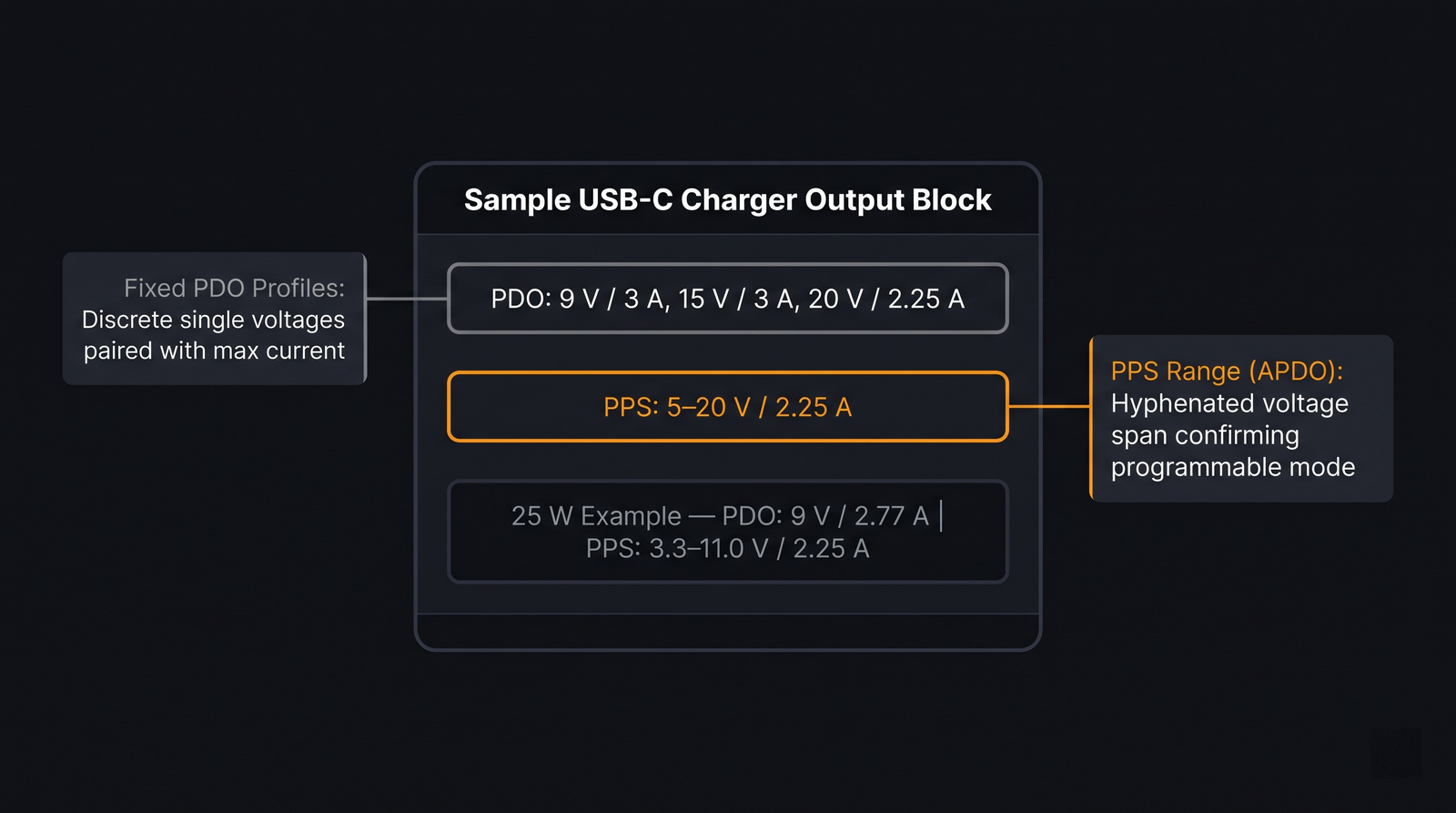
Fixed PDO listings always pair a single discrete voltage with a current ceiling, whereas PPS listings display a hyphenated minimum-to-maximum voltage span paired with maximum current. Official Samsung Galaxy charger specifications demonstrate how fixed PDOs and PPS envelopes coexist on the same USB-C port rather than replacing each other:
- 25 W adapter example (Samsung EP-T2510): Advertises a fixed PDO of
9 V / 2.77 Aalongside two PPS windows:3.3–5.9 V / 3 Aand3.3–11.0 V / 2.25 A. Multiplying voltage by current verifies how the electrical ceiling reaches the marketed rating:9 V × 2.77 A = 24.93 Won the fixed rail, and11.0 V × 2.25 A = 24.75 Wat the top of the upper PPS envelope. - 45 W adapter example (Samsung EP-T4511): Advertises fixed PDOs of
9 V,15 V / 3 A, and20 V / 2.25 A, paired with a wide PPS range of5–20 V / 2.25 A. At the top edge of either the 20 V fixed rail or the 5–20 V PPS span,20 V × 2.25 A = 45 W.
Applying that multiplication to any unfamiliar third-party brick exposes a common compatibility trap: a charger only approaches its advertised wattage inside PPS mode if the connected phone can negotiate near both the upper voltage and upper current edge of the listed window. If a phone is engineered to negotiate around 9–11 V in PPS mode, an adapter capped at 2.25 A cannot deliver full high-wattage output to that handset even when the same brick achieves full output at a higher voltage rail. Because regional adapter model codes and availability vary by country, always check the exact output block stamped on the unit in your hand.
Charger Compatibility Decision Matrix
Work through all four checks below in sequence whenever a USB-C setup fails to activate its expected fast-charging indicator.
| Compatibility Check | What to Look For on the Label | What It Confirms | Consequence If Missing or Mismatched |
|---|---|---|---|
| USB-C PD Support | “USB PD,” “PD 3.0,” or “PD 3.1” in official specifications | Charger supports digital USB Power Delivery negotiation over USB-C | Device falls back to basic USB power or a slower legacy charging tier |
| Fixed PDO Profiles | Discrete single-voltage pairs (one fixed voltage slash one current rating) | Charger supplies preset fixed voltage rails for non-PPS PD devices | Device cannot negotiate its target fixed fast-charge rail |
| PPS / APDO Range | Hyphenated voltage span paired with maximum current (min–max V / A) | Charger implements USB PD programmable voltage and active current-limit mode | PPS-dependent phones drop to a slower charging mode despite high charger wattage |
| Cable Current Rating | Explicit high-current amperage or full-featured USB Type-C wattage marking | Cable can safely carry the negotiated current or high-wattage tier | Cable caps current before the charger does, blocking upper fast-charge tiers |
Cable Bottlenecks, Device-Generation Rules, and Regional Scope
How Cable Current Ratings and Device Generations Shape Real-World Limits
Two USB-C to USB-C cables can look physically identical while enforcing very different electrical ceilings. Standard USB-C charging cables carry a 3 A rating, whereas 5 A cables—and full-featured USB Type-C cables built for upper USB PD 3.1 power tiers—embed internal identification circuitry so the charger and connected hardware can verify that higher current is electrically safe before ramping power.
Ignoring that cable ceiling is one of the fastest ways to misdiagnose a working charger. Samsung’s official Galaxy support documentation notes that reaching 45 W Super Fast Charging 2.0 on earlier supported models requires pairing a compatible travel adapter with a 5 A cable, because a standard 3 A cable caps current before the adapter can supply its peak profile.
However, cable requirements are device-generation-specific rather than permanent across every release. Samsung’s updated Galaxy support guidance clarifies that newer hardware starting with the Galaxy S25 series can achieve Super Fast Charging 2.0 using the bundled 3 A USB-C cable depending on the negotiated voltage-to-current profile. Checking both the cable’s stamped rating and the exact handset generation’s official support page prevents spending money on unnecessary replacements while ruling out genuine cable bottlenecks.
Global USB-C Protocol Rules vs. Regional AC Mains Hardware
USB Power Delivery and PPS digital negotiation on the DC USB-C output side are governed globally by USB-IF specifications, meaning the handshake logic never varies by country. A compliant PD/PPS charger negotiates the exact same PDO and APDO contracts whether it is plugged into a wall outlet in North America, Europe, the United Kingdom, or Asia.
What does vary by region sits strictly on the AC wall-input and compliance side: physical plug prongs, regional AC mains grids (such as 120 V / 60 Hz in North America versus 230 V / 50 Hz across Europe, the UK, and much of Asia), local electrical safety certifications (such as UL, FCC, or CE), and regional charger SKU availability. Many dual-voltage travel adapters—including Samsung’s EP-T4511, specified for 100–240 V AC input—accept international mains voltages through a passive mechanical plug adapter while keeping USB-C PD and PPS behavior completely unchanged.
Frequently Asked Questions About USB-C PD and PPS
Is it safe to charge a non-PPS phone or laptop with a PPS-enabled USB-C PD charger?
Yes. PPS-capable USB-C PD chargers advertise standard fixed PDO rails alongside their programmable ranges. When a non-PPS phone, tablet, or laptop connects, USB PD digital negotiation ignores the PPS entries and automatically selects a mutually compatible fixed rail.
Why does a multi-port PPS charger sometimes drop out of Super Fast Charging when a second device is plugged in?
Multi-port chargers share a single internal power budget and renegotiate available profiles whenever another port becomes active. For example, Samsung’s official support documentation notes that its multi-port 65 W adapter (EP-T6530) supports Super Fast Charging 2.0 only when a single device is connected to Port 1, dropping that tier once additional ports draw power simultaneously.
Does PPS keep charging at peak voltage and wattage from empty to full?
No. Because USB PD with PPS is a sink-directed architecture, the connected device periodically requests adjusted voltage and current targets as battery state of charge rises and internal temperatures climb. Lower power draw during the second half of a charging cycle reflects normal battery-protection requests from the device rather than a failed PPS handshake.
Why can two PPS chargers with the same headline wattage trigger different charging modes on the same phone?
Identical headline wattage does not guarantee identical PPS voltage-current envelopes. One brick may reach its maximum rating only by pairing higher voltage with lower amperage, while another supplies higher current inside a lower smartphone voltage window—so only the adapter whose PPS envelope overlaps the phone’s requested operating point unlocks its top charging tier.
Before You Troubleshoot Your Device
For official protocol definitions and device-level compatibility rules, consult the USB-IF USB Power Delivery Overview, the USB-IF Specification Document Library, and the Samsung Galaxy Charger Compatibility Guide. Before opening a warranty claim or assuming a damaged charging port, swap in a second USB-C to USB-C cable with a verified amperage or wattage rating stamped on its connector housing to rule out an unmarked cable bottleneck.
Sources
- USB Implementers Forum (USB-IF) — USB Charger (USB Power Delivery) Overview
- USB Implementers Forum (USB-IF) — USB Power Delivery Specification Document Library (Revision 3.3, Version 1.0)
- USB Implementers Forum (USB-IF) — USB-C Source Power Test Specification (V1.2, November 4, 2026)
- USB Implementers Forum (USB-IF) — USB-C Source Power Test Specification (May 24, 2021)
- USB Promoter Group — USB Power Delivery 3.1 Specification Announcement
- USB Implementers Forum (USB-IF) — USB Power Delivery Technical Overview (Sink-Directed Charging)
- Samsung UK Support — Which Type of Charger Does My Galaxy Device Accept?
- Samsung UK Support — Enable Fast Charging and Fast Wireless Charging on Samsung Galaxy
Last reviewed: November 22, 2026