This portable charger buying guide walks you through the decision in order: match the charger’s output and protocol support to the devices you own, then judge capacity, port layout, size, and travel rules. This guide walks through that sequence so you can read any power bank’s spec sheet, compare models fairly, and know which details to confirm before you buy. It does not rank products or recommend a single capacity, because the right choice depends on what you charge and where you carry it.
Table of Contents
1. Start With the Devices You Need to Charge
Brand names and big capacity numbers are what marketing pushes first, but they are the wrong starting point. A power bank is only useful if it can deliver the power your devices ask for, in the way those devices expect it. That makes the first step an inventory of what you want to charge, not a comparison of chargers.
List Your Devices and Their Charging Requirements
Write down every device you expect to plug in: phone, earbuds, smartwatch, tablet, handheld game console, laptop. For each one, note two things: the battery capacity and the charging power the manufacturer lists. You can usually find both on the product’s spec page, in the manual, or printed on the original wall charger. Battery capacity tells you how much energy you need to refill. The input power rating tells you how quickly the device can accept it. If a manufacturer does not publish a charging wattage for a device, treat that as an open question to resolve before buying, not a number to guess.
Decide Whether You Need Phone-Only, Multi-Device, or Laptop Charging
Most buyers fall into one of three groups. Phone-only users have modest power needs, so weight and pocketability matter most. Multi-device users need several outputs working at once, so port layout and shared output matter. Laptop users have the highest power requirement and usually end up with the largest, heaviest bank. A bank that suits a phone may not be able to power a laptop at all, while a laptop-capable bank can be unnecessary bulk if you only top up earbuds. Pick the heaviest job you expect to do regularly, because that sets the minimum output you should look for.
2. Check Charging Output, USB-C, and Protocol Compatibility
Output is where most spec-sheet confusion starts. The connector, the charging protocol, the wattage, and the cable all have to line up, and the weakest link sets the result.
Understand Watts, Volts, and Amps
Power in watts equals volts multiplied by amps. A charger delivering 5 volts at 3 amps provides 15 watts, and 9 volts at 3 amps provides 27 watts. Spec sheets often list several voltage and current combinations because chargers and devices negotiate which one to use. A higher-wattage charger does not force extra power into a device. The USB Implementers Forum (USB-IF) describes USB Power Delivery as letting each device take only the power it requires, so a device draws what it was designed for, up to what the charger offers.
USB-C Is a Connector, Not a Guarantee of Fast Charging
USB-C describes the shape of the plug and port. How much power flows through it depends on separate charging specifications that both ends must support. USB-IF presents USB Power Delivery as its own specification for delivering flexible power along with data over a single cable, built to work within the existing USB ecosystem. In practice, a USB-C label alone does not tell you which charging features a port supports or how much power it can supply. The spec sheet has to state the wattage and the protocols, so look for them in writing.
Check USB Power Delivery, Quick Charge, and PPS Support
USB Power Delivery (PD) is the USB-IF standard. According to USB-IF, revision 3.1 raised the ceiling to 240 watts over a full-featured USB-C cable, up from a previous 100-watt limit that relied on 20-volt operation and cables rated for 5 amps. The same page describes new fixed voltages of 28, 36, and 48 volts and an adjustable voltage mode in which a device can request intermediate voltages. Those figures are limits of the standard, not what any particular power bank delivers. You will also see Quick Charge and PPS listed on spec sheets. Support for any of them depends on both the power bank and the device, so confirm each in the manufacturers’ own documentation instead of assuming that the same label behaves the same way on every phone, tablet, or handheld.
Verify the Cable and Your Device’s Power Requirements
The cable is part of the charging system. USB-IF’s description of higher power levels ties them to cables built for those levels, which is why the 100-watt tier assumed 5-amp-rated cables and the 240-watt tier required an updated cable definition. A thin cable packed in with a small accessory may limit a laptop’s charging speed even when the power bank and laptop both support more. Check the cable maker’s stated power rating, and check your device maker’s published charging requirements, before you decide that a bank “doesn’t work.”
3. Understand Battery Capacity: mAh vs. Wh
Capacity is the most advertised number and the most misread one. The printed figure is usually in milliamp-hours (mAh), but what you actually want to know is how much energy the battery stores.
What mAh Tells You — and What It Does Not
Milliamp-hours measure electric charge, not energy. Anker’s support documentation makes this point directly: the mAh value on a power bank is not the same as usable energy, and the real measure of energy is the watt-hour (Wh). Because energy depends on voltage as well as charge, two products that both say 10,000mAh can store different amounts of energy if their ratings were stated at different voltages. Manufacturers also express capacity in different ways, such as at the internal cell voltage or as an equivalent at the output voltage. Comparing mAh across brands without checking the voltage behind the number can be misleading.
How to Convert mAh to Watt-Hours
The conversion is:
Wh = (mAh × V) ÷ 1,000
The FAA’s passenger guidance describes the same calculation: divide milliamp-hours by 1,000 to get amp-hours, then multiply by volts. Example: a 10,000mAh battery at a nominal 3.7 volts works out to 10,000 × 3.7 ÷ 1,000 = 37 Wh. Anker notes that most lithium-ion power banks use cells with a nominal voltage of 3.7 volts, but that is an assumption you should check against your product. Many batteries print the Wh rating on the label or spec sheet, and when it is there, use it. Whenever you convert yourself, write down the voltage you used.
Why Actual Charging Results Differ From Advertised Capacity
A power bank has to raise its internal cell voltage, nominally 3.7 volts, to 5 volts or higher to charge devices, and that conversion wastes some energy as heat. Anker’s documentation describes roughly 80–85% efficiency in the power bank’s circuitry and a further loss of about 15% inside the device being charged, and it states that actual results vary by device model and usage conditions. Treat those percentages as one manufacturer’s explanation, not a universal rule or a fixed percentage for all power banks.
To see the effect, take the 37 Wh example above and assume 82% circuit efficiency and 85% device-side efficiency, both within the ranges Anker describes. That leaves roughly 25.8 Wh delivered to a device. Against a hypothetical phone battery of 15 Wh, that is about 1.7 full charges. This is illustrative arithmetic under stated assumptions, not a prediction for any product or phone.
Estimate Your Capacity Needs Without Assuming a Fixed Number of Charges
Rather than trusting a charge-count claim, run the estimate yourself. First, find your device’s battery size in Wh, converting from mAh with its voltage if needed. Second, decide how many full refills you want between wall charges. Third, multiply the two to get the energy your devices must receive. Fourth, divide by the combined efficiency you assume, which is about 0.70 if you use the 82% and 85% figures above. For example, 2 refills of a 15 Wh phone means 30 Wh delivered, which points to a bank rated around 43 Wh. Round up modestly if you want a margin, and remember this is a planning estimate. Your devices, your cables, and your usage will move the real number, so no mAh rating can guarantee a set number of charges.
4. Compare Ports and Simultaneous Charging
A bank with several ports does not necessarily deliver full power to all of them at once. Two numbers on the spec sheet answer that question, and they are easy to confuse.
Single-Port Maximum Output vs. Total Output
The single-port maximum is the most one port can deliver when it is the only one in use. The total output is the combined budget shared across ports when several are active. If a sheet lists one port at “up to X watts” and the total at “Y watts” and Y is less than the sum of the ports’ maximums, the ports cannot all run at their maximums together. Do not assume every port can hit its individual maximum at the same time. Look for both figures, and if the product page lists only one of them, treat the missing one as unknown until the manual or manufacturer confirms it.
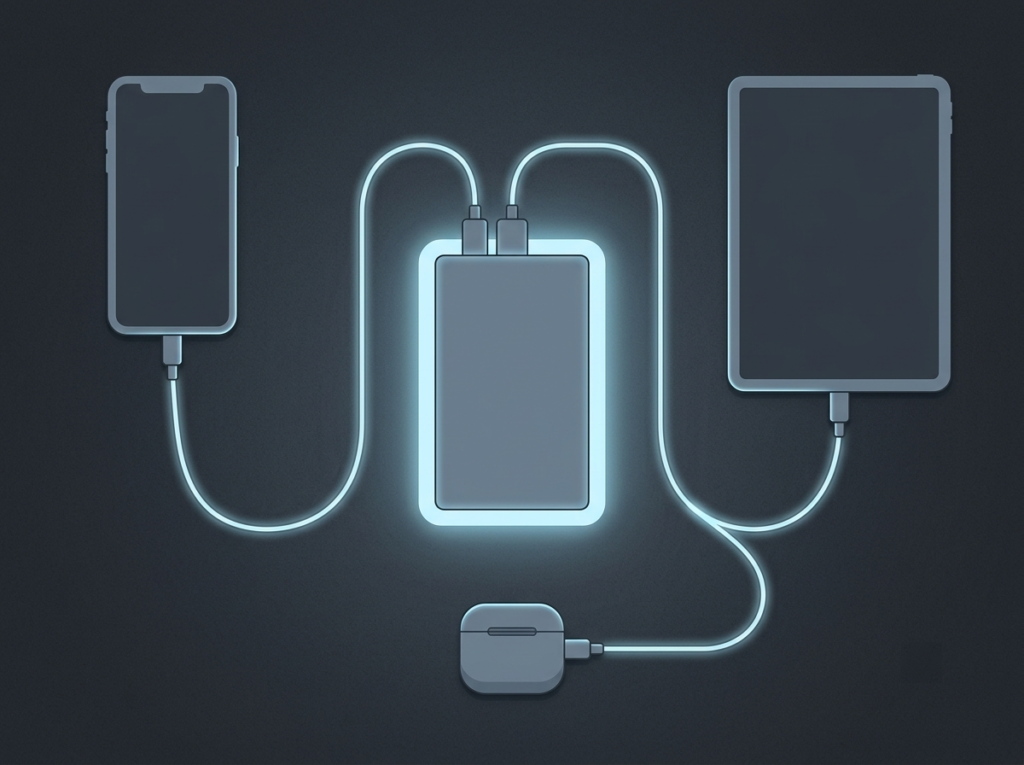
What Happens When You Charge Multiple Devices at Once
When several devices share a bank, the available power is divided, and how it is divided differs by model. Some banks assign set output levels depending on which ports are occupied; others adjust dynamically. A phone plus earbuds draws far less than a phone plus a tablet, so the same bank can feel fast in one case and slow in the other. The most useful document is a table in the manual showing output for each port combination. If you cannot find one, plan around the lowest-case behavior instead of the headline number.
5. Balance Capacity With Size, Weight, and Convenience
Capacity is stored energy, and stored energy takes up room. Larger-capacity banks generally weigh more and occupy more space, which is why the best bank for a weekend trip is rarely the best bank for a jacket pocket.
Choose for Everyday Carry, Long Days Out, or Extended Trips
For everyday carry, a compact bank that covers roughly one refill of your phone is easy to forget in a bag. For long days out, such as festivals, field work, or sightseeing, you may accept more weight in return for several refills or a second device. For extended trips, capacity matters more, but so do airline limits covered below, and a very large bank may not be allowed in the cabin. Compare the listed weight and dimensions alongside the Wh rating, and weigh them against how often you will carry the bank in a given month. Price tends to rise with capacity and output, so each step up should answer a real need.
Consider Wireless Charging, Built-In Cables, and Other Extras
Wireless pads, built-in cables, kickstands, and display readouts add convenience, and some people use them daily. Not every extra is worth paying for. For each feature, ask whether you would use it weekly, whether it changes the rated output or the product’s weight and size, and whether a separate cable you already own would do the same job. A built-in cable cannot be replaced if it fails, while a loose cable can. Pay for the extras you will actually use and skip the rest.
6. Check Portable Charger Rules Before Flying
U.S. air travel has federal baseline rules for power banks, and individual airlines can be stricter. Last verified against the FAA and TSA pages cited below: October 13, 2026.
Understand the FAA’s Watt-Hour Limits
The FAA classifies power banks and portable chargers as spare lithium-ion batteries. Per its PackSafe lithium battery page, rechargeable lithium-ion batteries are limited to a rating of 100 Wh per battery. With airline approval, a passenger may also carry up to two spare larger lithium-ion batteries in the 101–160 Wh range. The FAA’s passenger FAQ adds that batteries above 160 Wh are forbidden on passenger aircraft. For batteries under the 100 Wh limit that are for personal use, the FAA lists no quantity limit. Check the Wh figure printed on your power bank, or calculate it with the formula in the capacity section.
Confirm Carry-On, Spare-Battery, and Airline-Specific Rules
Spare lithium-ion batteries, including power banks, must travel in carry-on baggage only. The TSA’s power charger page says the same: carry-on yes, checked bags no. The FAA also requires battery terminals to be protected from short circuit, and it lists methods such as keeping the bank in its retail packaging, taping exposed terminals, or using a case or pouch. The FAA states that many airlines, domestic and international, may set stricter quantity and Wh limits, including a cap on how many power banks each passenger may bring regardless of capacity. Its guidance table also notes that TSA security, individual airline, and international rules may at times be more restrictive than the federal baseline. Treat the FAA and TSA rules as the floor, not the whole answer.
How to Check Your Airline’s Current Requirements Before Departure
Use a short routine. Find the Wh rating on your bank, or calculate it. Compare it with the FAA limits above. Then open the baggage or dangerous-goods page of the airline operating your flight and look for rules on power banks, including any limits on how many you can carry. Check again close to your departure date, because policies can change and the FAA’s own pages show the date they were last updated. If the airline’s wording is unclear, contact the airline before you pack instead of relying on a general rule.
7. Match the Charger to Your Use Case
The table summarizes what to prioritize in each situation. The notes below it explain the reasoning and the details that decide each case.
| Use Case | Priority | What to Verify | Main Tradeoff |
|---|---|---|---|
| Smartphone-only | Compatible fast charging and low weight | The charging wattage and protocols your phone’s maker lists; the bank’s Wh rating | More capacity adds weight and bulk |
| Multiple small devices | Port layout and shared output | Per-port limits and combined output when several ports are in use | Charging together can slow individual devices |
| Laptop charging | Enough output and a matching protocol | Your laptop’s rated input power, the bank’s matching output, and the cable’s rating | Larger, heavier, and usually costlier |
| Frequent air travel | A printed Wh rating within airline limits | The Wh label against FAA limits and your airline’s own policy | Rules can cap how much capacity you can carry |
For a Smartphone Used Throughout the Day
For one phone, start with the charging wattage and protocols your phone’s maker publishes, then pick the lightest bank that covers the refills you actually need using the estimate method above. A bank far above your phone’s needs mostly adds weight. The main tradeoff is between capacity and pocketability, so verify the Wh rating and the weight together. If you are also sorting out cases, cables, and other add-ons, our guide to choosing the right phone accessories covers that side of the decision.
For Someone Charging Several Small Devices
If you carry a phone, earbuds, and a watch, port layout and shared output matter more than any single maximum. Look for the combined output figure and the manual’s per-combination breakdown. Small accessories draw little, so a moderate shared budget can serve them well. The tradeoff is speed: when you plug everything in at once, each device may charge more slowly than it would alone. Check that the bank has enough ports of the right connector type for your gear without needing adapters.
For a Laptop or Other Higher-Power Device
For a laptop, begin with its rated input power, found on the original charger’s label or the manufacturer’s spec page. Then confirm that the bank’s port can supply at least that output over a protocol your laptop accepts, using a cable rated for the power level. If the bank cannot match the laptop’s requirement, it may charge slowly or not at all. Laptop-capable banks are larger, heavier, and costlier, so verify that you need that capability before accepting the extra bulk.
For Frequent Air Travel
Frequent flyers should prioritize a clearly printed Wh rating, because that figure decides what you can bring under FAA rules and what an airline may accept. Confirm the rating against the FAA limits, then read your airline’s own policy, including any cap on the number of power banks. The tradeoff is that rules can limit how much capacity you can carry, so a smaller bank you are sure about is often more practical than the largest one allowed on paper.
8. Portable Charger Buying Checklist
- Device requirements: note each device’s battery size and the charging power its maker lists.
- Output and protocol: confirm the bank states a wattage and the protocols (PD, Quick Charge, or PPS) your devices support.
- Connector and cable: match the connector type and use a cable rated for the power level you expect.
- Capacity: find the Wh rating, or convert from mAh using the stated voltage.
- Ports: check both the single-port maximum and the combined output when several ports are used.
- Weight and dimensions: compare them against how and how often you will carry the bank.
- Travel: check the Wh rating against FAA limits and your airline’s own policy before flying.
9. Frequently Asked Questions
What If My Power Bank Is Damaged, Recalled, or Overheating?
The FAA says damaged or recalled batteries that are likely to create sparks or dangerous heat must not be carried aboard an aircraft unless the damaged or recalled battery has been removed or otherwise made safe. It points travelers to the Consumer Product Safety Commission’s recall listings and to the manufacturer for recall information. If a battery overheats, swells, smokes, or burns during a flight, the FAA says to notify the flight crew immediately.
What Happens If My Carry-On Bag Is Checked at the Gate?
The FAA instructs passengers to remove all spare lithium batteries and power banks from the bag before it is checked at the gate or at planeside and to keep them with them in the cabin. Spare power banks are not permitted in checked baggage.
Do Rules Differ for Luggage With a Built-In Battery?
Per the FAA’s table, bags equipped with lithium batteries must be carried on unless the batteries can be removed. Batteries that are removed are then subject to the same rules as spare batteries, so check the Wh rating and keep them in the cabin.
10. Sources
- FAA PackSafe: Lithium Batteries
- FAA: Airline Passengers and Batteries
- TSA: Power Charger
- Anker Support: Why Is the Rated Capacity of Power Banks Lower Than Expected?
- USB-IF: USB Charger (USB Power Delivery)
- U.S. Consumer Product Safety Commission: Recalls
Last reviewed: October 13, 2026